The VIKTOR AI platform gives you one place to automate engineering workflows, test them thoroughly, and share them with your colleagues. It is built on three pillars that work together, as shown below: building engineering apps, scaling them across your organization, and connecting them to the engineering tools your team already relies on, like SAP2000, PLAXIS or ETABS.
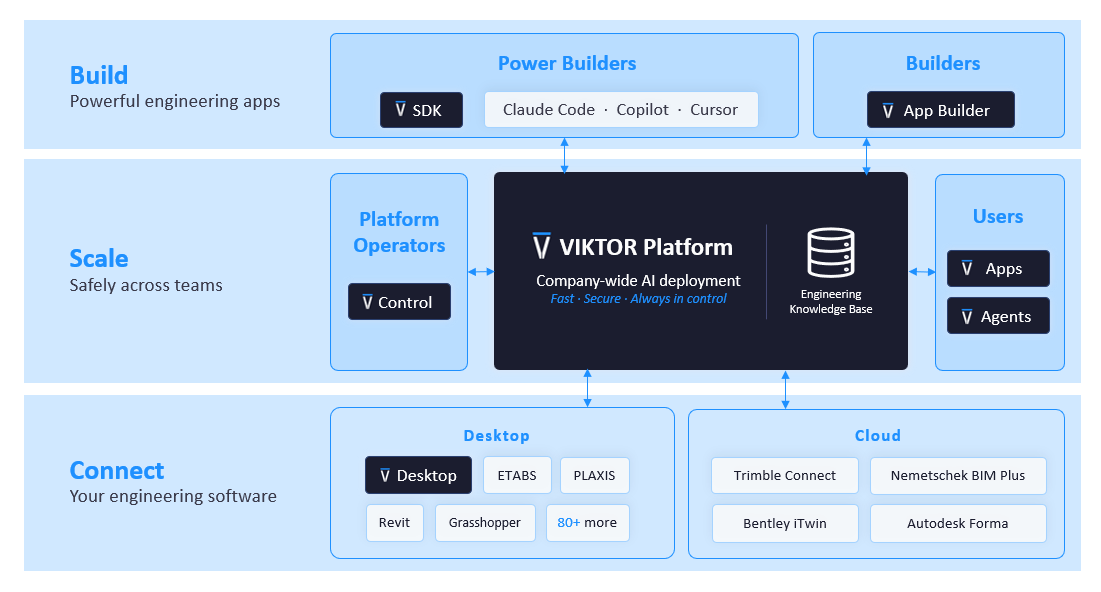
This blog focuses on one part of that platform: connecting AI-built workflows directly to SAP2000. The same platform also includes a knowledge base that stores your company's engineering standards and best practices, and governance features — permissions, testing, and version control — that let you share these apps safely across your team once they're built.
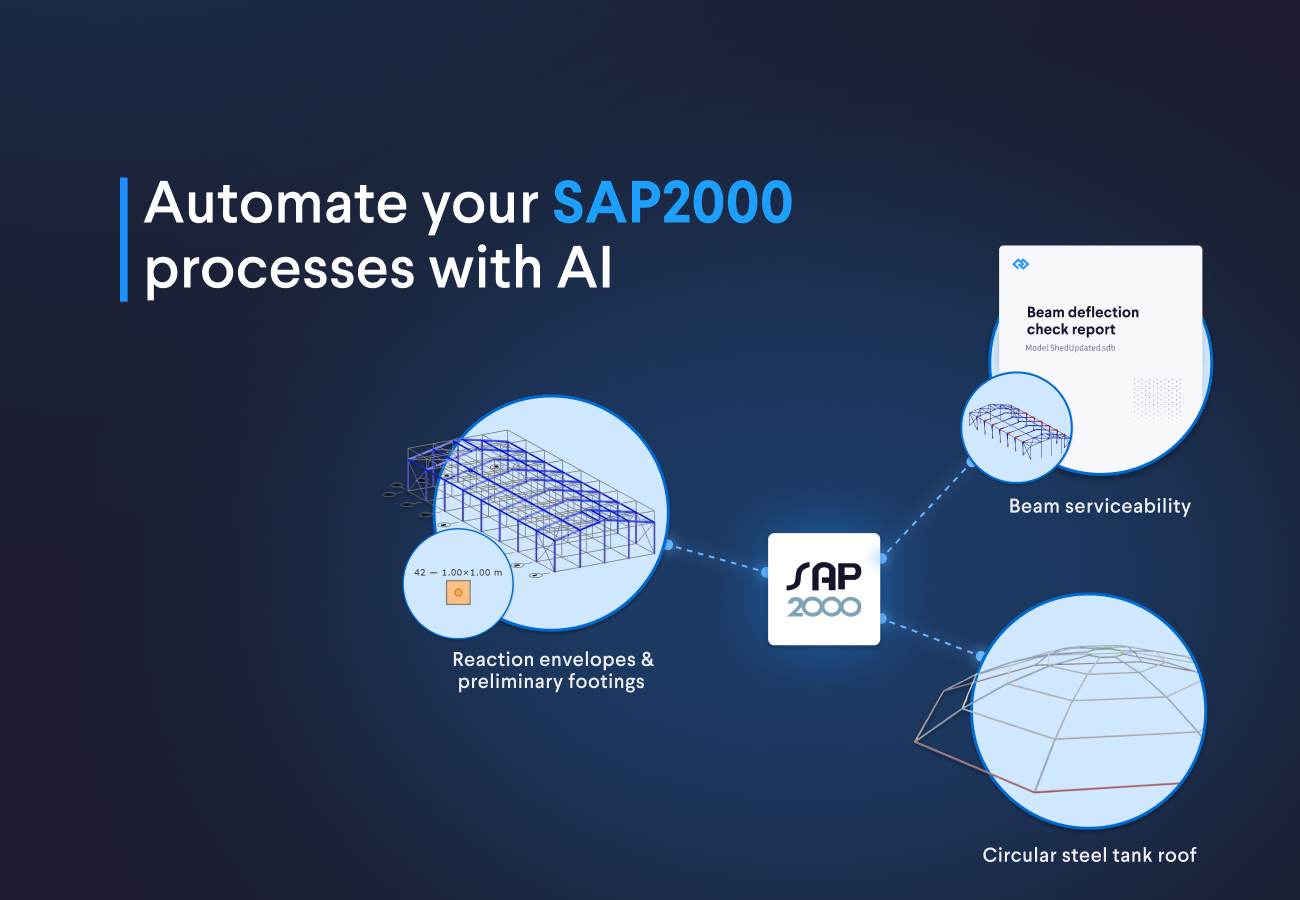
In this blog, you will automate the following SAP2000 workflows:
- A circular steel tank roof: save time on repeated model setup by generating a parametric roof and retrieving the perimeter reactions needed for the concrete tank design
- Reaction envelopes and preliminary footings: reduce manual Excel postprocessing by enveloping every load combination, sizing centered footings from axial compression, and reviewing their positions in plan
- Beam serviceability: accelerate checking and reporting by assessing every beam and load combination, then turning the raw deformation results into a formatted engineering report
How do I create a circular tank roof and retrieve reactions in SAP2000 with VIKTOR AI?
The VIKTOR AI prompt below generates a parametric circular steel tank roof in SAP2000 and returns the perimeter reactions needed for the concrete tank design.
You can change the tank radius, central opening, roof rise, radial frame count, ring count, steel section, and gravity loads without rebuilding the model by hand. The app creates the geometry, runs SAP2000, and returns the reactions at every perimeter support. These reactions provide a clear handover from the steel roof analysis to the concrete tank design. If the design changes, you can update the steel structure and retrieve the new reactions in seconds instead of spending days rebuilding the model and postprocessing the results. This saves significant time and effort during design iterations.
Before running the prompt, you can download and install VIKTOR Desktop, sign in, and add the SAP2000 Connect integration. This gives the app a managed connection to the licensed SAP2000 installation on your Windows computer.
Once VIKTOR Desktop is online, use the prompt below to open the App Builder and create the first automation.



Create a circular steel tank roof with SAP2000
To test the app, start with a small roof model and compare the applied vertical loads with the total support reactions. You can then increase the number of radial frames and rings, review the geometry, and confirm the reaction signs before using the results in the tank design.
How do I design footings from SAP2000 reaction envelopes with VIKTOR AI?
This VIKTOR AI prompt reads every load combination from an existing SAP2000 model, envelopes the reactions, and sizes centered square footings from the governing compressive load.
I have personally spent many hours exporting reaction tables to Excel, cleaning the data, building my own envelope, identifying the governing combination for every support, and transferring the axial loads into a separate footing calculation. Every change to the SAP2000 model meant repeating that work. This VIKTOR AI footing prompt removes those steps by starting from the model the engineer already has open and analysed.
The app reads every load combination reaction, creates the vertical envelope, and uses the governing compressive load to size a centered square footing. Horizontal reactions and moments remain outside this simplified axial design. The governing combination, uplift status, footing assumptions, bearing pressure, 3D model, and footing plan stay visible in one application. This saves time and preserves the link between the SAP2000 results and the preliminary foundation design.
You can test this prompt with any analysed SAP2000 model you have available. Use the prompt box below to create the application.
Design footings from SAP2000 reaction envelopes
To validate the app, open the joint reaction results in your analysed SAP2000 model and compare them with the reaction envelope table in VIKTOR. Check several supports and load combinations, and confirm that the units, support names, governing combinations, and F3 sign convention match. Once the reaction values are correct, inspect the model with its footing solids and the 2D footing plan. Every rectangle uses the support's model coordinates, so you can compare its position and size with the existing SAP2000 model. The footing calculation uses axial load and uniform bearing only. The engineer must still check shear, flexure, reinforcement, eccentricity, sliding, settlement, and the applicable design code.
How do I assess beam deformation and serviceability in SAP2000 with VIKTOR AI?
This VIKTOR AI prompt checks every beam and load combination in an existing SAP2000 model against a user-defined deflection limit and generates a formatted engineering report.
After automating the reaction envelope and footing postprocessing, the final workflow applies the same attach method to beam serviceability. In the past, I exported displacement tables from SAP2000 to Excel, sorted the results for every load combination, postprocessed the values, and checked the deformation of each beam manually. Preparing the engineering report took even more time because I had to move the results into Word, format the tables, add equations, and write the governing findings.
With this prompt, the app reads every load combination automatically, excludes columns, and creates a raw table for every beam and combination. It then compares relative deformation with a user defined L/n limit and creates a black and white engineering report with equations, assumptions, governing results, and members that need review. If the model has no output station at the exact center of a span, the app uses the nearest available station and reports the offset instead of inventing a midpoint result.
Assess beam deformation in SAP2000
You can also extend this application by adding a download button for the engineering report or an Excel export of the complete deformation table. This makes it easier to archive the results, share the findings with colleagues, or continue the review outside the app.
You can use the prompts below to add these features:
Keep the results from the previous analysis in memory and add a button to download a PDF engineering report with the governing results, equations, assumptions, failed members, and review notes without running SAP2000 again.
Keep the results from the previous analysis in memory and add a button to export the complete deformation table to Excel, including the beam name, load combination, governing step, span, station, absolute U3, relative U3, limit, utilization, and status, without running SAP2000 again.
How to use VIKTOR AI for SAP2000 structural analysis
You have now used three prompts to create SAP2000 apps for a circular tank roof, footing design from reaction envelopes, and beam serviceability assessment. The next question is how you can keep using AI to build and improve these workflows safely. The VIKTOR platform gives you a controlled environment where you can turn more engineering ideas into SAP2000 applications, test them with small models, and improve them before sharing them with your team.
The App Builder generates the application code in the VIKTOR platform, and the SAP2000 integration connects the app to SAP2000 through VIKTOR Desktop. You do not need to install Python or run AI generated Python code directly on your computer. The generated code has access only to the SAP2000 integration configured through VIKTOR Desktop, not to the rest of your local device. This gives teams a safer way to scale prompt driven development across the organization, spark innovation, and optimize engineering processes.
How does VIKTOR AI know how to create models in SAP2000
In addition to providing a secure way to automate SAP2000 workflows with AI, the VIKTOR platform includes a knowledge base. The knowledge base is one of the central components of the platform. VIKTOR stores engineering information specific to the industry and your company, including internal methods, design guidance, terminology, and workflow requirements, only within your company's secure environment. AI can combine this knowledge with your prompt and curated SAP2000 integration guides to create models and applications in SAP2000.
You can take this further by connecting SAP2000 to other tools your team already uses, including AutoCAD, Autodesk Forma Site Design, and Grasshopper. VIKTOR brings the data, calculations, company knowledge, and software connections into one controlled workflow. This allows teams to build cross software applications quickly without moving files and scripts between disconnected tools. The applications stay within VIKTOR's security and access controls and can be tested, governed, and shared from one place.
What's next for the SAP2000 integration
The current SAP2000 integration supports workflows that create new models and workflows that connect to existing analysed models. The team is now working to extend it with the following capabilities.
- Direct access to the built in SAP2000 cross section libraries or material database
- The option to return a saved SAP2000 model file to the VIKTOR app for download or reuse
We know these capabilities are central to day-to-day structural engineering. You can help us prioritize them by sharing your feature request on the VIKTOR Community.
Conclusion
These three prompts show how you can use SAP2000 for more than a single analysis session. You can create a reusable tank roof model, transfer support reactions into preliminary footing sizing, and review beam serviceability without repeating the same exports by hand. The value goes beyond saving time in SAP2000. The apps also reduce the hours spent cleaning Excel files, building envelopes, checking members one by one, and formatting engineering reports in Word. The VIKTOR platform brings the inputs, SAP2000 results, calculations, visualizations, and reporting into workflows that teams can test, share, and improve. Engineers can spend more time reviewing the results and making design decisions instead of repeating postprocessing and reporting tasks.
Try one of the prompts above and adapt it to a SAP2000 workflow your team repeats often. You can start with VIKTOR here.
Related Blog Posts
October 02, 2026
Autodesk University 2026 recap: Automate Civil 3D and AutoCAD workflows with VIKTOR AI and MCP
Read more
September 22, 2026
Automate Civil 3D workflows with VIKTOR AI: prompts for road alignments, profiles and cross-sections
Read more
September 14, 2026