With the new ETABS integration in the VIKTOR platform, any engineer can automate ETABS workflows in minutes, without writing or maintaining code. In this blog, we’ll show you how with three practical examples: comparing structural layouts under gravity loads, evaluating seismic performance, and estimating preliminary footing sizes for a steel warehouse.
The VIKTOR AI platform gives you one place to automate engineering workflows, test these thoroughly and share them with your colleagues. It's built on three pillars that work together, shown below: a knowledge base that gets smarter with every project, governed distribution once an app is ready to scale, and connections into the engineering tools your team already relies on, like ETABS.
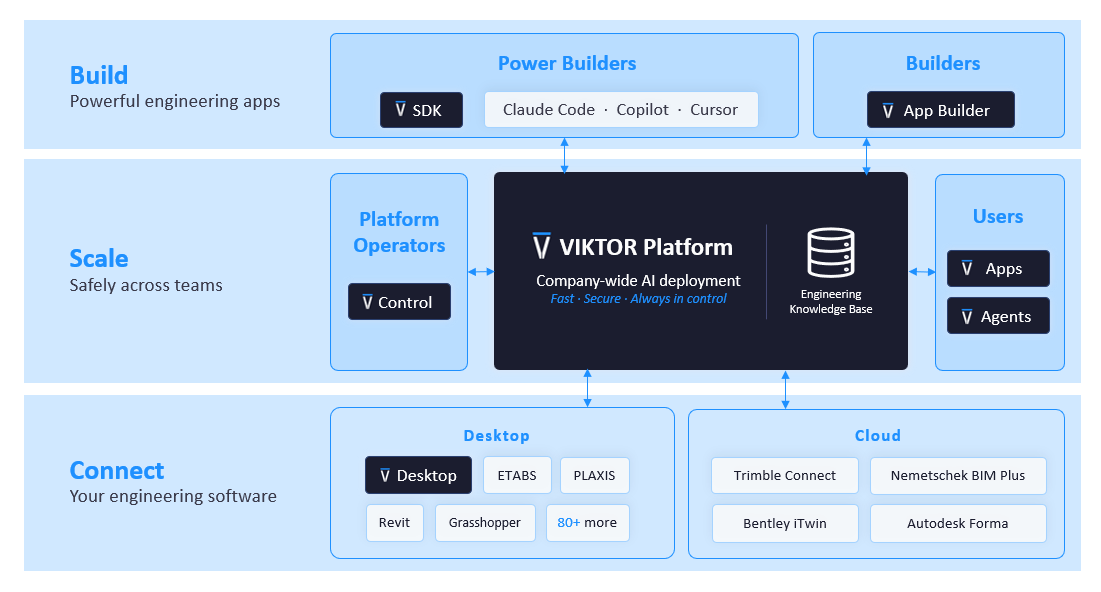
VIKTOR uses AI to turn a simple prompt into an automated workflow, while VIKTOR Desktop connects that workflow to ETABS running on your computer. No custom coding or complex installations are needed. The connection stays within VIKTOR’s security and access controls, and you can share the app with the right users, review revisions, collect feedback, and improve it without sending scripts around the office. The ETABS integration is currently in its early stages, so it offers the clearest value today for creating new, compact models for feasibility studies, early design testing, and small buildings.
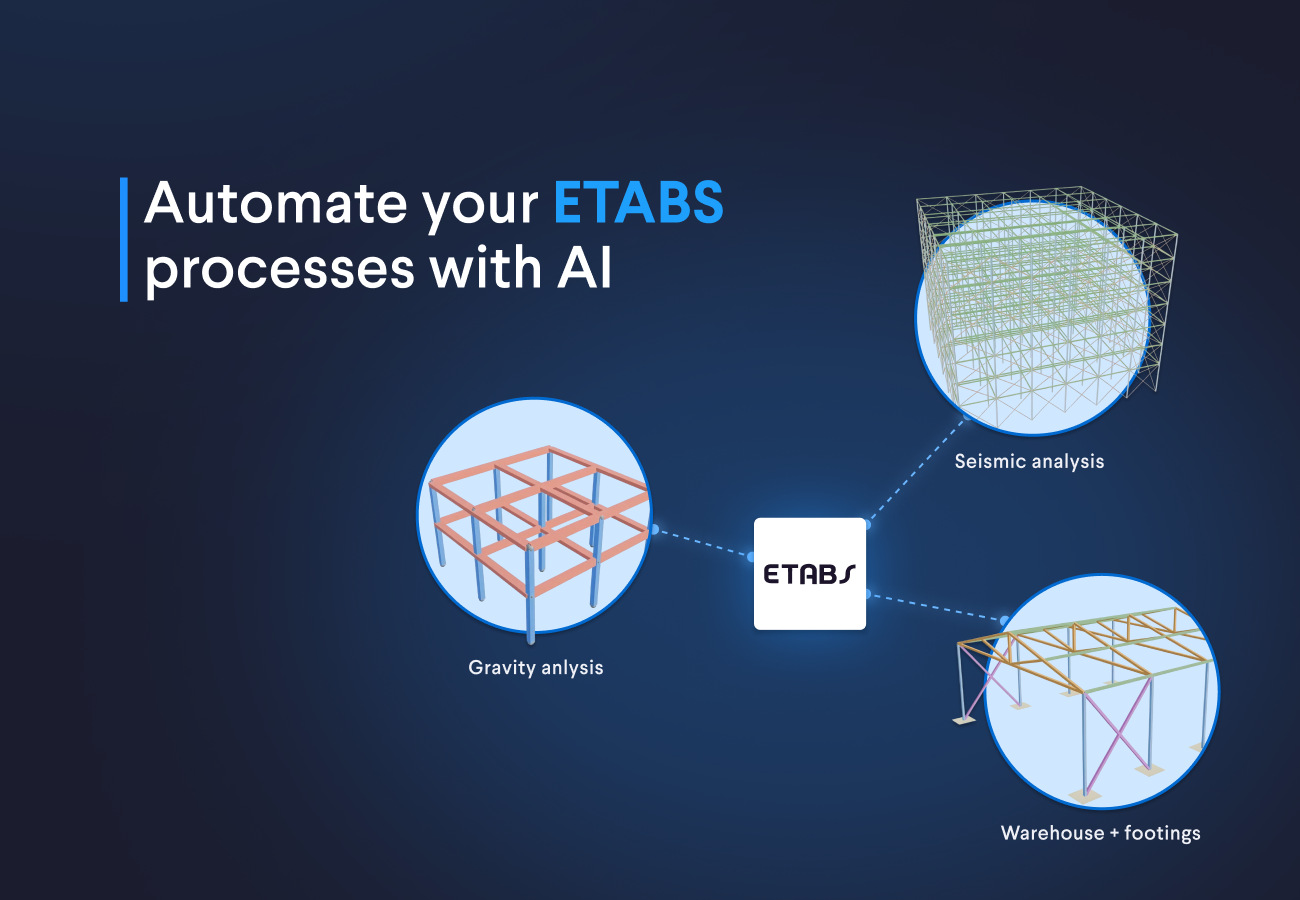
In this blog, you will automate the following ETABS workflows:
- A parametric gravity-load building: to compare structural grids and estimate starting sizes for main beams, secondary beams or joists, and columns, saving time on repeated model setup
- A preliminary seismic braced building: to compare story drift, column demand, and brace axial forces, so you can focus further work on the most promising concept
- A steel warehouse with roof trusses: save time on early foundation estimates by applying roof gravity loads, calculating support reactions, and sizing preliminary isolated footings
These three apps were built using just one part of the VIKTOR platform: the App Builder. From there, VIKTOR also gives you the tools to securely share and manage your apps across your organization and connect them to the engineering software your team already uses.
How do I create a parametric gravity-load building in ETABS with AI?
The first automation creates a regular reinforced-concrete building with primary beams, secondary beams, and columns. It is a good starting point because it follows a practical early-design sequence. You define a grid, assign gravity loads, run a linear analysis, and review member demands and reactions. You can change the bay layout, number of stories, section sizes, secondary-beam spacing, and dead and live loads without rebuilding the model by hand. The result is not a final code design, but it gives you a reusable basis for comparing layouts and selecting reasonable starting sections for the main beams, secondary beams or joists, and columns.
You can use the prompt box below to open the App Builder and create the first automation.



Create a parametric 3D reinforced-concrete gravity-frame building
You can download and install VIKTOR Desktop, sign in, and add the ETABS integration. This gives the app a managed connection to the licensed ETABS installation on your Windows machine.
Once VIKTOR Desktop is online, you can start with a small regular model and let the ETABS integration create a new analysis model from the app inputs. You can use the app to vary the grid, sections, and gravity loads, compare alternatives faster, and check the geometry, load directions, units, and result equilibrium.
How do I check seismic drift and bracing forces in ETABS with AI?
After the gravity example, the focus moves to lateral behavior with a regular steel braced building. This automation is useful for early seismic studies because you can change the number of stories, bay widths, column and brace sections, bracing arrangement, and a user-defined preliminary base-shear coefficient, then compare drift and force demand without rebuilding every alternative. The app returns story displacement and drift, base reactions, column forces, and brace axial forces so you can see which parts of the lateral system control the concept.
Use the following prompt to create the seismic model and review story drift and bracing forces.
Check seismic drift and bracing forces in ETABS
After the App Builder creates the app, you can run a compact test model first and compare the ETABS base shear, drift pattern, brace-force signs, and reactions with hand calculations. From there, you can use the App Builder to improve the layout, add result filters, or change the bracing options. This helps you compare alternatives faster while keeping the engineering assumptions visible.
How do I size warehouse footings in ETABS with AI?
Finally, you can use the same approach to create a steel warehouse with triangular roof trusses. The app lets you control the building span, length, frame spacing, eave height, roof slope, and structural sections. It applies dead and live loads to the roof, runs the ETABS analysis, and uses the governing compressive reaction at each support to estimate an isolated footing size. This connects the warehouse geometry, gravity load path, support reactions, and preliminary foundations in one workflow, so you can compare configurations without rebuilding the model and footing calculations by hand.
Use the following prompt to create the warehouse model and calculate preliminary footing sizes.
Size warehouse footings in ETABS
After the App Builder creates the app, you can test it by starting with a small warehouse and comparing the applied roof gravity load with the total vertical reactions. You can then change the span, frame spacing, roof slope, or truss sections and review how each option affects the support reactions and preliminary footing dimensions. This gives you a faster way to compare warehouse configurations and prepare early foundation estimates from the same ETABS model.
How to use AI for ETABS building design
You have now used three prompts to create ETABS apps for gravity analysis, seismic studies, and warehouse footing estimates. The next question is how you can keep using AI to build and improve these workflows safely. The VIKTOR platform gives you a controlled environment where you can turn more engineering ideas into ETABS applications, test them with small models, and improve them before sharing them with your team.
The App Builder generates the application code in the VIKTOR platform, and the ETABS integration connects the app to ETABS through VIKTOR Desktop. You do not need to install Python or run AI-generated Python code directly on your computer. The generated code does not receive unrestricted access to your local device. This gives teams a safer way to scale prompt-driven development across the organization, spark innovation, and optimize engineering processes.
How does AI know how to create models in ETABS
In addition to providing a safer way to create ETABS apps with AI, the VIKTOR platform includes a knowledge base. The knowledge base is one of the main pillars of the platform. It stores engineering information specific to the industry and your company, including internal methods, design guidance, terminology, and workflow requirements, of course only within your company’s secure environment. AI can combine this knowledge with your prompt and curated ETABS integration guides to create models and applications in ETABS.
What's next for the ETABS integration
The current ETABS integration is optimized for preliminary design workflows that create new models and run supported analyses. The team is now working to extend it with the following capabilities.
- Direct access to the built-in ETABS cross-section libraries or material database
- Connections to an ETABS instance that is already running
- Workflows that use existing models and their results
- The option to return a saved ETABS model file to the VIKTOR app for download or reuse
We know these capabilities are central to day-to-day structural engineering. You can help us prioritize them by sharing your use case on the VIKTOR Community.
Conclusion
These three prompts show how you can use the ETABS integration for gravity analysis, preliminary seismic studies, and warehouse footing estimates without rebuilding every model from scratch. The VIKTOR platform brings the inputs, ETABS analysis, and results into reusable apps that you can test, share, and improve as your workflow develops. This helps you compare concepts faster, keep assumptions visible, and spend less time repeating model setup and result processing.
Try one of the prompts above and adapt it to an ETABS workflow your team repeats often. You can start with VIKTOR here.