
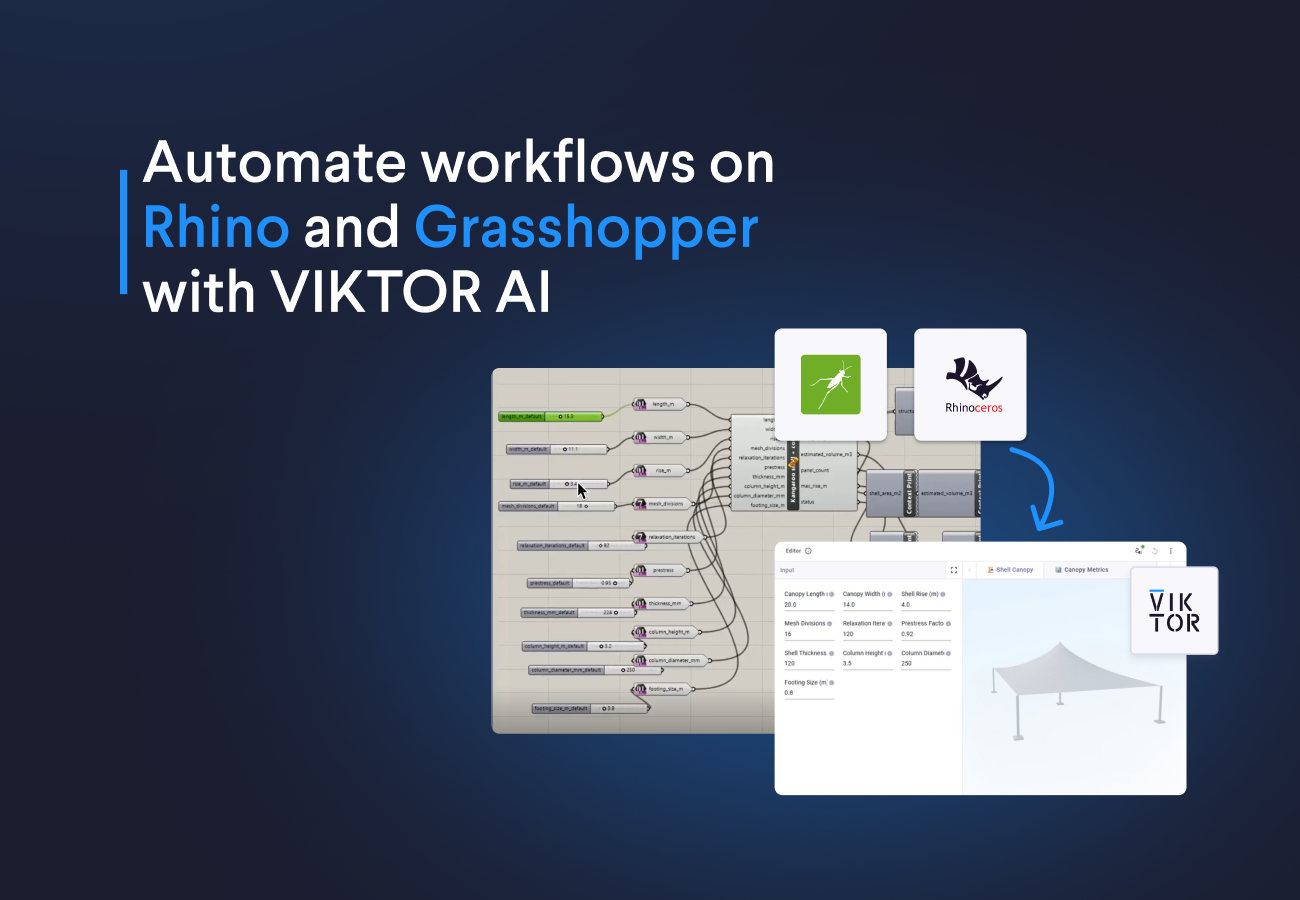
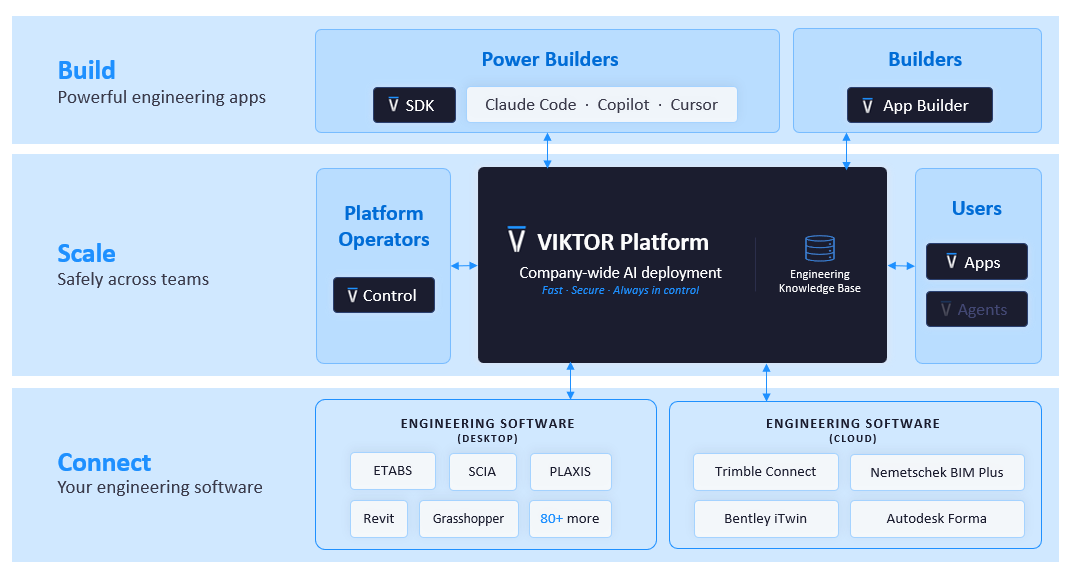
Creating the app with the VIKTOR App Builder is only the tip of the iceberg, as it is part of the broader VIKTOR platform. In the examples below, I will show you how I use the platform’s different components throughout the workflow, from the knowledge base that stores engineering information specific to the industry and the company, to VIKTOR Desktop, which connects the application to Rhino and Grasshopper on my computer. I will also show you how to test, validate, and scale the application throughout your organization.
We will build a complete application for designing and analyzing a parametric canopy. These are the prompts I will use throughout the process:
- Prompt 1: Create a parametric canopy structure in VIKTOR, powered by Grasshopper and Kangaroo. We will use VIKTOR input fields and a 3D view to automate the workflow and explore design alternatives faster.
- Prompt 2: Optimize footing sizing with VIKTOR and Grasshopper. We will automate pad foundation sizing in VIKTOR, then use Grasshopper to update the geometry with the calculated dimensions for a more optimal design.
- Prompt 3: Automate carbon footprint analysis. We will use VIKTOR to run multiple Grasshopper design alternatives and estimate the carbon impact of each one for more sustainable design decisions.
Automate canopy design with VIKTOR, Grasshopper, and Kangaroo
I will start by turning a Grasshopper definition file (.ghx) of the canopy structure into a VIKTOR app.
This used to be a manual process. I remember my colleague Rick had to translate Grasshopper definitions into VIKTOR apps by hand. It was a time consuming task. Now, you can change the .ghx file extension to .xml, attach the file in the App Builder, and let it handle the conversion.
I found this especially useful because it makes the process more accessible to people like me who are not Grasshopper experts but simply want to solve an engineering problem on the VIKTOR platform, regardless of the software they use.
Let’s see this in action by using the prompt box below to open the VIKTOR App Builder and describe the engineering problem we want to solve.



Build a VIKTOR app from a Grasshopper definition.
Try it now!
Then download the Grasshopper file (I’ve already renamed it to .xml for you), attach it to the VIKTOR App Builder, and run the second prompt below.
Copy this prompt to expand your app!
After the App Builder creates the app, make sure the following components are installed and running before you continue:
-
Make sure Rhino is installed.
-
Download and install VIKTOR Desktop. VIKTOR Desktop is a Windows application that gives you one place to install, configure, run, and monitor your personal integrations, so you can manage the connection to Grasshopper from your computer.
-
Sign in to VIKTOR Desktop and configure the Grasshopper worker.
-
Open Rhino, type
Grasshopperin the Rhino command bar, and press Enter to open Grasshopper. Create a new empty Grasshopper document and keep it open so VIKTOR Desktop can run jobs locally from the app.
Now you can return to the VIKTOR app and run it!
You should end up with a VIKTOR app that exposes the Grasshopper inputs as clear fields and shows the canopy in a 3D view. This lets us use the parametric power of Grasshopper and Kangaroo without changing the definition by hand every time, making it much easier to explore design alternatives directly from the VIKTOR interface.
Optimize footing sizing with VIKTOR and Grasshopper
The first prompt gave us a working connection and returned the Grasshopper results. From there, we continued in the same VIKTOR App Builder conversation and extended the application with the next engineering step.
For the next step, we want the app to collect axial loads and bending moments, calculate pad foundation dimensions, and send those new dimensions back into the geometry workflow.
Optimize footing sizing with Grasshopper and VIKTOR. Try it now!
The geometry and engineering checks were connected instead of becoming separate workflows. I did not need to move between a Grasshopper file, a separate foundation spreadsheet, and another geometry viewer. The inputs, calculation, and updated model stayed in one application where the team can review and verify the complete process.
Automate carbon footprint analysis with VIKTOR and Grasshopper
For the final step, we wanted to compare several design options instead of running only one geometry at a time. So we continued in the same VIKTOR App Builder conversation and added one final step to the application.
The carbon sweep changes the width and shell rise across a user defined range. It runs the alternatives in Grasshopper, reads the estimated volume, and calculates the total carbon using one combined carbon factor.
Automate Grasshopper analyses now!
The value of this final prompt was orchestration. VIKTOR defined and ran the sweep logic, Grasshopper produced the geometry and volume for every case, and VIKTOR presented the results in a clear and polished visualization.
The value of the VIKTOR platform and Grasshopper
Grasshopper gives us a powerful way to create parametric geometry. VIKTOR gives us a place to save the results from several projects instead of leaving files scattered across local computers. This makes it easier to find, reuse, and review the work later.
The VIKTOR platform also gives the team one place to improve the application. We can ask for feedback, create a revision process, and keep different versions of the app in one place. Administrators can control who has access to the app, so the right people can use it and the team can keep track of the approved version.
In addition to supporting collaboration and governance, the VIKTOR platform is built on years of experience in the AEC sector. It maintains a knowledge base with industry and company-specific engineering information, giving the VIKTOR App Builder more context when it helps create apps and workflows. This helps teams build tools that reflect their own engineering standards and ways of working.
Teams can also use a virtual machine to run the Grasshopper and VIKTOR workflow. This means users can use the application without having Rhino and Grasshopper installed on their own computer.
Conclusion
With these three prompts, we created one application that connects to a Grasshopper definition, visualizes Rhino geometry, sizes pad foundations, and compares volume and carbon across several design options. This let us explore design alternatives faster and share the workflow with others instead of keeping it as a local Grasshopper file. The process showed us that we did not need to master every tool before we could start building a useful workflow around it.
If your team has valuable Rhino and Grasshopper files that are difficult to share or scale, use the same approach to turn them into reviewed applications. Sign up for VIKTOR and try it yourself.
Related Blog Posts
September 14, 2026
Automate AutoCAD drawings with VIKTOR AI: 3 prompts for parametric structures and details
Read more
August 27, 2026
Automate QA/QC checks in ETABS with VIKTOR AI: Lessons from our structural engineering masterclass
Read more
August 19, 2026