
Designing beam reinforcement
Designing the beam reinforcement for a building used to take 360 Engineering one and a half to two weeks per project, depending on the building's size and complexity. Reinforcement is the steel placed inside a concrete beam to carry the forces the concrete can't carry on its own. The starting point is the internal forces from the structural model. For every beam, the engineer works out the reinforcement needed at each section, chooses the bar diameters and layout, and makes sure the design complies. The team calculates its structures in SAP2000, which gives the internal forces for each member. From there, the engineers used post processing Excel tools to work through the results beam by beam.
"We need to collect these results in several sections, record the bending moments and shear forces, and calculate the reinforcement needed in Excel, section by section. It's time-consuming."

João Raposo
Associate Structural Engineer at 360 Engineering
Once the reinforcement was calculated, the engineer chose the bar diameters and layout for each beam. A draftsperson then drew the beam elevations and placed the rebars in AutoCAD by hand.
The process cost time on both the engineering and the drafting side. Even though 360 Engineering have long used internally developed post-processing tools, generally based on Excel, developing and maintaining these in line with the needs of the team was always a challenge.
Automate beam reinforcement design with VIKTOR AI in SAP2000 and AutoCAD
360 Engineering used VIKTOR AI to automate beam reinforcement design and now gets a first reinforcement proposal for an entire building in less than an hour.
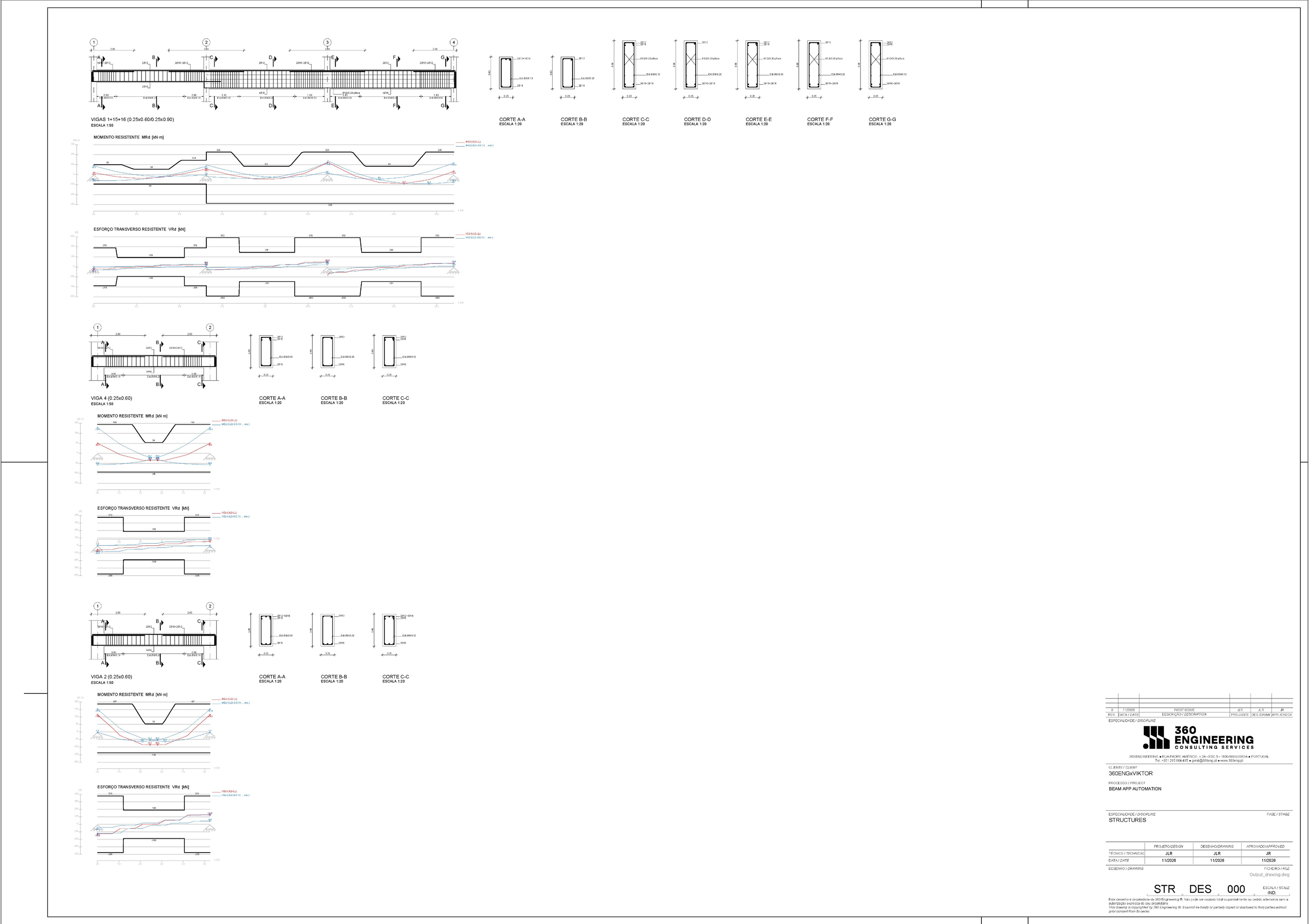
Instead of reading force diagrams beam by beam, the engineer uploads the SAP2000 results once. The app proposes reinforcement for each beam, generates drawings, and produces a calculation report, so the engineer can then check every result before it's incorporated into an ongoing project.
Today, the beam reinforcement design process runs as follows:
- Select the relevant beams in SAP2000, run the calculation and export the results to Excel.
- Upload the Excel file to the app.
- Set the basic project information, such as the materials and the rebar diameters to use.
- Review the summary table, where the app analyzes each beam and proposes reinforcement.
- Download the beam drawings as an AutoCAD drawing (DWG) file and copy them into project sheets.
- Download the calculation report in Excel to check every result.
The result: 60% less time, more control
On a typical project, the previous beam reinforcement design and detailing workflow took 64 to 72 combined engineering and drafting hours. The app cuts that time by 60%. The calculation itself takes minutes. The remaining time goes into the engineer checking the results and finalizing the drawings.
“The engineer is still responsible for the engineering decisions. But the application does the repetitive work, and we save a lot of time.”
João Raposo
Associate Structural Engineer at 360 Engineering
Next to faster calculations, the app also lets the team: • Generate the beam drawings directly, so draftspersons no longer draw elevations and place rebars by hand • Store every result the same way, so it can be checked and rechecked, whoever worked on the project • Compare reinforcement options early, for example 2 bars of 20 mm against 3 bars of 16 mm, and check directly if the design still complies, which reduces revisions after the first draft • Provide more detailed input for the bill of quantities
360 Engineering designed the app so that engineers can always see what happens.
“There are several software solutions on the market that are what we call a black box. We want speed and efficiency, but we also want to control what we get and to be able to check it.”

Jorge Rocha
Founding partner of 360 Engineering
The time saved also helps 360 Engineering handle a high workload in the Portuguese market, where experienced engineers are hard to find. The team reduces production bottlenecks without affecting project quality, allowing them to increase the productivity levels to comply with the existing workload. This also frees up time to review design options, coordinate with other disciplines and develop project-specific details.
What's next: columns, Revit and wider adoption
The beam reinforcement app is just one of several apps 360 Engineering have built on the VIKTOR AI platform. A similar app for column reinforcement is already in use. Together, the two apps cover a significant share of repetitive reinforcement design and detailing tasks for reinforced concrete buildings.
Most of 360 Engineering's projects are developed as 3D models. The team is also developing a bridge between its calculation applications on the VIKTOR AI platform and Revit, using tools developed in-house by 360 Engineering. The aim is to transfer reinforcement design outputs into the model and automate reinforcement modelling, beam elevations, sections and drawing preparation, reducing repeated data entry and helping keep calculations, models and drawings aligned.
With VIKTOR AI, 360 Engineering can have more engineers automate more of their processes while keeping its quality requirements in place. The apps that they produce move through a development, testing, acceptance and production (DTAP) pipeline before they reach the team, and role-based permissions control who can publish and use each app.
"We have no doubt that this is part of the mix of options a design company needs to have at this moment, when we are seeing a shift in the market."
Jorge Rocha
Founding partner of 360 Engineering
About VIKTOR AI
VIKTOR is an AI platform that automates engineering processes, safely and at scale. Engineers use AI to build apps on the VIKTOR AI platform These apps connect to the tools engineers already use, such as SAP2000, Revit, AutoCAD and Excel, and are shared across the organization with permissions and version control in place. Today, 35,000 users have built 30,000 engineering apps on VIKTOR AI. Want to see how your team can automate repetitive design work like 360 Engineering? Book a demo
About 360 Engineering
360 Engineering is a structural and civil engineering design firm based in Lisbon. The team combines engineering expertise, BIM workflows and in-house software development to improve how projects are designed, coordinated and documented (www.360eng.pt).