
Learn how to automate structural engineering with AI agents in this webinar

We'll cover three concrete design applications, starting from a basic use case to more complex apps:
-
Prompt 1: One-way and two-way shear concrete checks: You will create an app that checks one-way (beam) and two-way (punching) shear, so you can choose footing thickness and plan size early and quickly see which footing sizes work.
-
Prompt 2: Singly reinforced beam design: You will create an app that designs a singly reinforced beam by calculating the required steel area and picking a bar layout, so you can make a safe design without overusing steel.
-
Prompt 3: Flexural reinforcement of a rectangular footing: You will create an app that calculates the required footing reinforcement in both directions from loads and input parameters, with nice visualizations and an optimization step to help you choose a safe, cheaper design.
After running these prompts, you will end up with 3 applications that can be shared and used for all your team, you can also improve them and make them suit your concrete design workflow, so let's start!
What is VIKTOR AI?
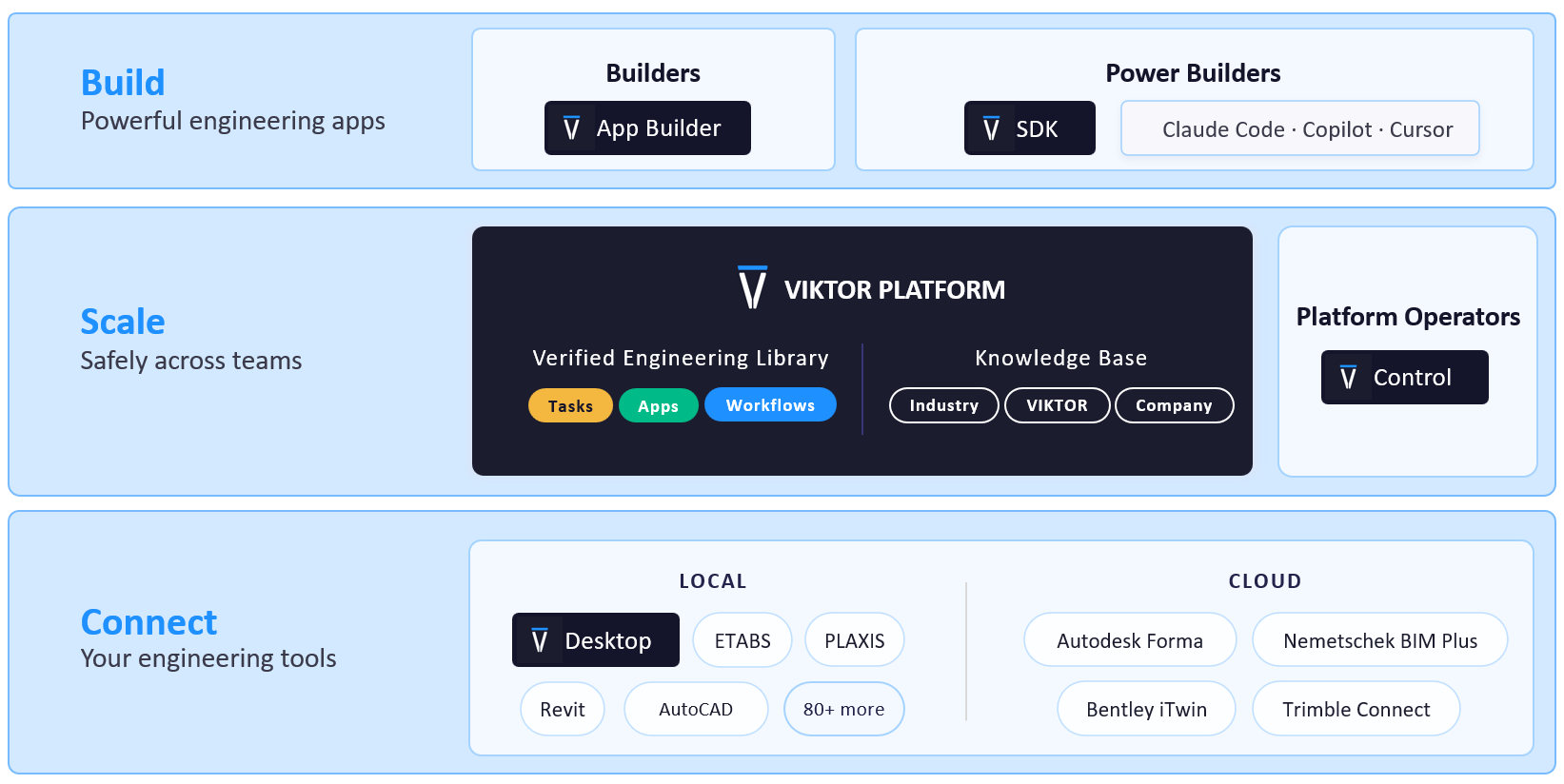
The VIKTOR platform gives you one place to automate engineering work, connect to the software you already use, and share apps with your team. You describe what you want to achieve, and VIKTOR AI turns your requirements into an app that performs calculations, processes project data, or generates reports. The Knowledge Base helps your team keep the engineering knowledge behind these workflows available for future projects.
Before sharing an app, your team can check it through development, testing, acceptance, and production (DTAP) stages, with VIKTOR Control managing governance and permissions. Once the app is ready, colleagues can find it in the Engineering Library and use it on another project by providing new project data. This lets your team build on existing knowledge and tested workflows, so you can spend more time reviewing results and making engineering decisions.
Prompt 1: One-way and Two-way shear concrete checks
In this first prompt, we are creating a simple decision tool that helps answer a very practical early design question: will this concrete footing work, or do we need to change its size?
The app will check whether a concrete foundation can resist shear forces, which are critical failure modes in foundations. If shear capacity is insufficient, the footing can fail suddenly, so these checks are always required by design codes.
This is especially useful early in a project when engineers are sizing the foundation. Typically, you would manually change values in a spreadsheet and check each variation one by one. With this app, you can run an optimization script to automatically find the most efficient footing dimensions instead of manually iterating through different sizes to find the optimal solution.
This application will follow the ACI 318 standard from the American Concrete Institute (ACI), which provides the code requirements for structural concrete design. We will take advantage of large language models (LLMs) and their training data, which includes engineering calculations and design codes, to generate the app. The key point is turning a standard engineering check into a tool that anyone on the team can use consistently.
At the end of this section, you will have a web app that helps you choose an efficient footing thickness and plan dimensions by running one-way shear and two-way (punching) shear checks.
Use the prompt box below to launch the App Builder:



Concrete Footing Shear Checker
Prompt 2: Singly reinforced beam design
In this second prompt, we are creating a tool that designs the steel reinforcement inside a concrete beam.
Concrete can carry high compressive forces, but it cracks easily when it is pulled or bent. We embed rebar to increase the strength against tensile forces. Designing a beam comes down to a fundamental question: how much steel is needed, and where should it be placed, to safely resist the applied loads without wasting material?
This calculation is highly repetitive across building projects. Engineers follow the same code rules and equations, then iterate when dimensions or loads change. Typically, you would change rebar sizes and the number of bars in a spreadsheet and check each variation. The app can consider all these combinations in an optimal way instead of doing it manually.
 Although the training data of the LLM is sometimes enough to create engineering apps, we can take advantage of one of the key features of the App Builder: image understanding. You can attach one image in each chat with the App Builder, so you can send an engineering flowchart with the logic you want to build.
I prepared the following flowchart with the ACI 318 equations to design a concrete singly reinforced beam. These flowcharts are common in engineering codes, so you can adapt this to your own use case.
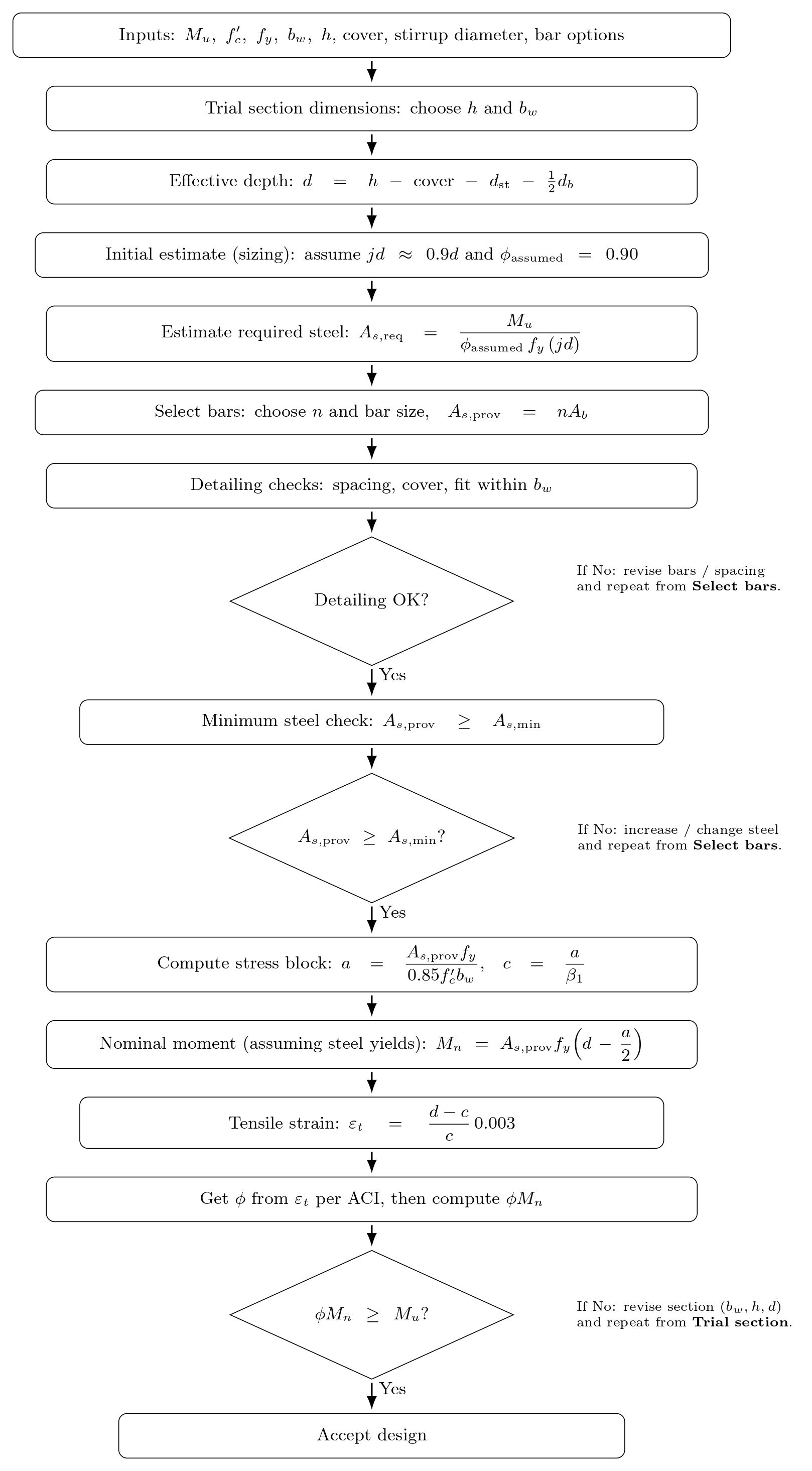
This application will have the logic shown in the image, so all the equations related to concrete design for beams will be included following ACI 318.
Save this flowchart as an image. Then, go to the main menu and click "Develop" to start a new chat. Attach the flowchart image to the App Builder and run the following prompt:
Optimize Concrete Beam Reinforcement
Prompt 3: Flexural reinforcement of a rectangular footing
In this third prompt, we are creating a tool that designs the steel reinforcement for a concrete footing.
While the first prompt checked if a footing size works (shear capacity), this one designs the required rebar. A footing spreads the load of a column or wall into the ground, and flexural checks ensure it does not crack and bend excessively under load. This bending creates tensile forces in the concrete, which must be resisted by steel reinforcement placed in two directions.
This is another routine task across projects that involves multiple steps and iterations, especially when loads or geometry change. Typically, you would manually calculate different rebar sizes and spacing configurations in a spreadsheet. The app can evaluate all these combinations to find the optimal reinforcement layout
Like the beam example, we'll use an engineering flowchart with the ACI 318 equations. This one even includes some visual aids to tell the model how we want our outputs to look.
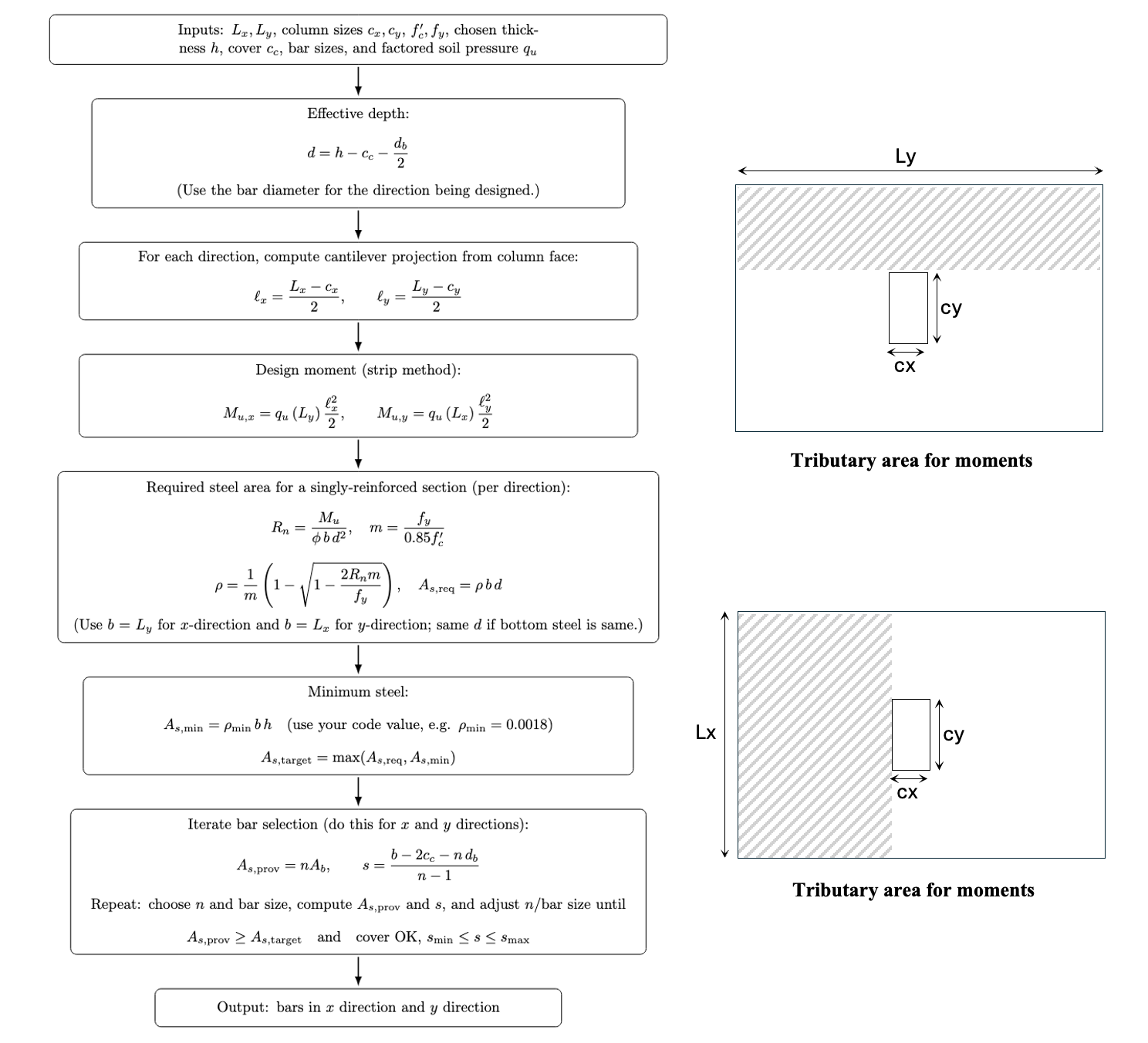
This application will have the logic shown in the image, so all the equations related to footing rebar design will be included following ACI 318.
Save this flowchart as an image. Create a new application by going to the main menu and clicking "Develop" to start a new chat. Attach the flowchart image to the App Builder and run the following prompt:
Concrete Slab Reinforcement Design
How to validate and extend this application
To validate and extend the application I always like to run the following prompts:
-
"Generate a complete report where I can see the intermediate steps of the calculations you are doing, add comments and references to it"
-
"Add the main equations you are using in the application in the parametrization (the inputs panel of the app) and if you are making any assumption list them there"
The App Builder now supports collaboration between team members. You can invite your colleagues to help you debug and check the application. You can learn how to use this feature here.
Conclusion
In this blog you learned 3 prompts to automate structural engineering tasks related to concrete design. We hope these prompts were your first step towards a safe way of creating engineering apps. If you want to give access to your team and learn more about what the App Builder can do, you can book a demo and a VIKTOR expert will be happy to showcase more!
Start building apps for free