
If you missed the webinar or want to revisit any part of it, the full recording will be available on demand here: Watch the recording.
In the following sections, I will show how you can use the VIKTOR platform and VIKTOR Desktop to connect your engineering software and create automations. You will:
-
Which engineering problem do you want to solve with the VIKTOR platform?
-
Connect engineering software more easily with VIKTOR Desktop
-
Create a parametric SCIA dome workflow from a prompt
Which engineering problem do you want to solve with the VIKTOR platform?
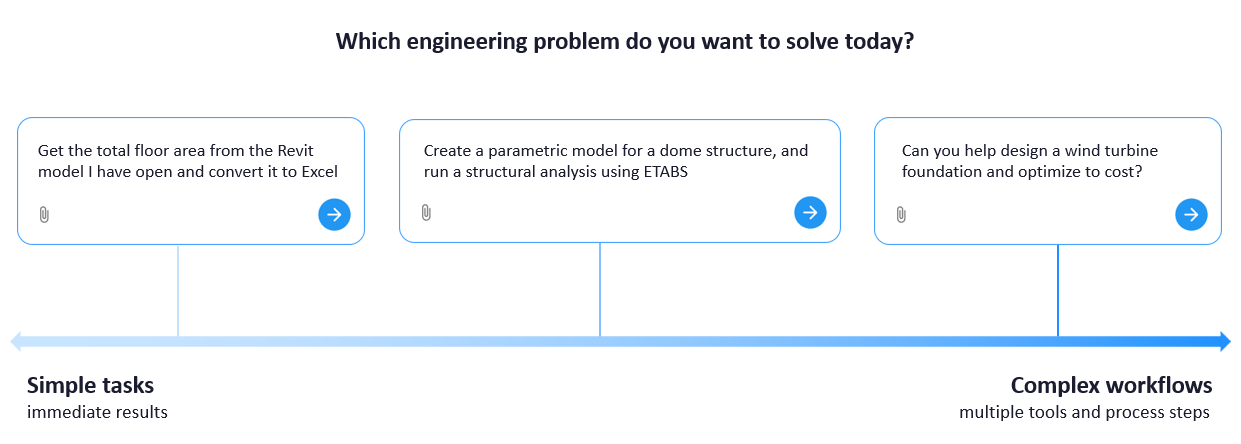
Stijn opened the webinar with this question. He showed how VIKTOR supports everything from simple tasks with immediate results to complex workflows with multiple tools and process steps.
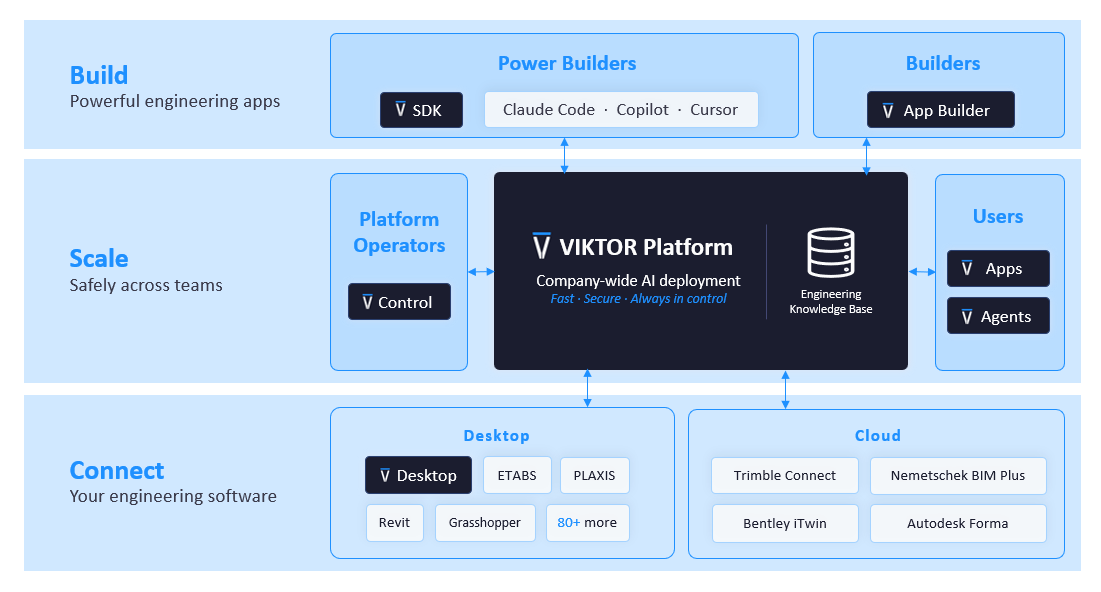
The VIKTOR platform is based on three pillars of the platform: build engineering apps, share and scale them across teams, and connect the software engineers already use.
However, connecting the desktop software behind these workflows has not always been simple. Each integration required its own worker installation and configuration. Connecting several tools meant repeating the setup, managing authentication keys, and using a technical terminal interface. This created friction and made integrations less accessible to engineers who were not familiar with the worker setup.
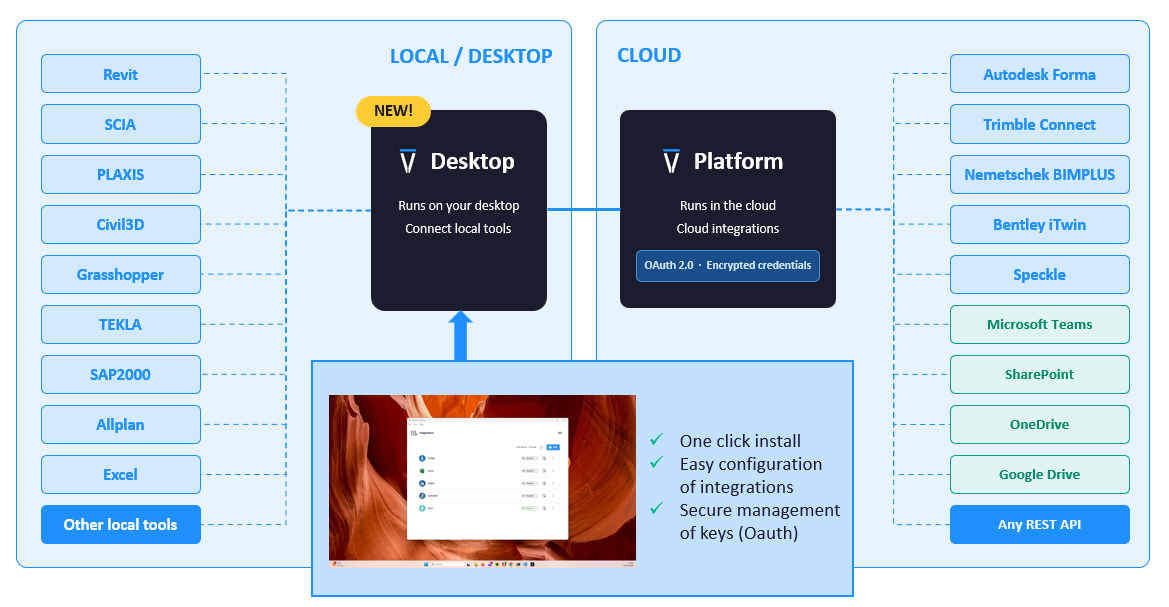
Connect engineering software more easily with VIKTOR Desktop
This is the problem Marcel addressed when he introduced VIKTOR Desktop. It brings desktop integrations into one clear environment where engineers can install, configure, authenticate, and manage their connections.
Instead of installing and configuring every worker separately, users can install an integration with one click. Most integrations require zero or one configuration field, and authentication happens through the VIKTOR platform without copying keys manually. This lowers the technical threshold and makes integrations easier to use across a team.
VIKTOR Desktop fits into the wider VIKTOR platform as the connection between apps and local engineering software. Stijn introduced what teams can automate, Marcel showed how VIKTOR Desktop simplifies the connection, and the next step was to demonstrate it with SCIA.
Marcel used a parametric 3D dome space truss to show how VIKTOR Desktop works in practice. A dome can contain many connected elements, so changing its geometry manually makes design exploration slow. With a VIKTOR app, engineers can adjust the radius, rise, number of rings, radial divisions, and section dimensions before running the analysis in SCIA.
You can use the following prompt to create the app:



3D Dome Truss Analysis
After App Builder creates the app, download VIKTOR Desktop and set up the SCIA integration. The first video shows how to install VIKTOR Desktop, configure the integration, and connect it to the app.
Next, download the SCIA ESA template and upload it to the app. The second video shows how to add the ESA file and run the workflow.
The app returns the dome geometry, axial force results, and the most tensioned and compressed members.
This turns a repeated modeling and analysis task into a reusable workflow. Engineers can compare design alternatives and understand the structural response without rebuilding the model for every change.
Wrapping up
The webinar showed how VIKTOR supports engineering automation from simple tasks to complex workflows, while VIKTOR Desktop makes local software integrations easier to set up and manage. This helps engineers connect their tools faster, reduce repeated configuration, and focus on solving the engineering problem. Marcel's SCIA example showed how this works in practice with an automation created from a prompt.
The same approach can connect other tools in your engineering software stack and make successful automation easier to share across a team. Which engineering problem do you want to solve? Start now with VIKTOR.