October 28, 2026
How to scale AI in your engineering organization: generate results you can trust

by VIKTOR
If you missed the webinar or want to revisit any part of it, watch the full recording here
What is VIKTOR AI?
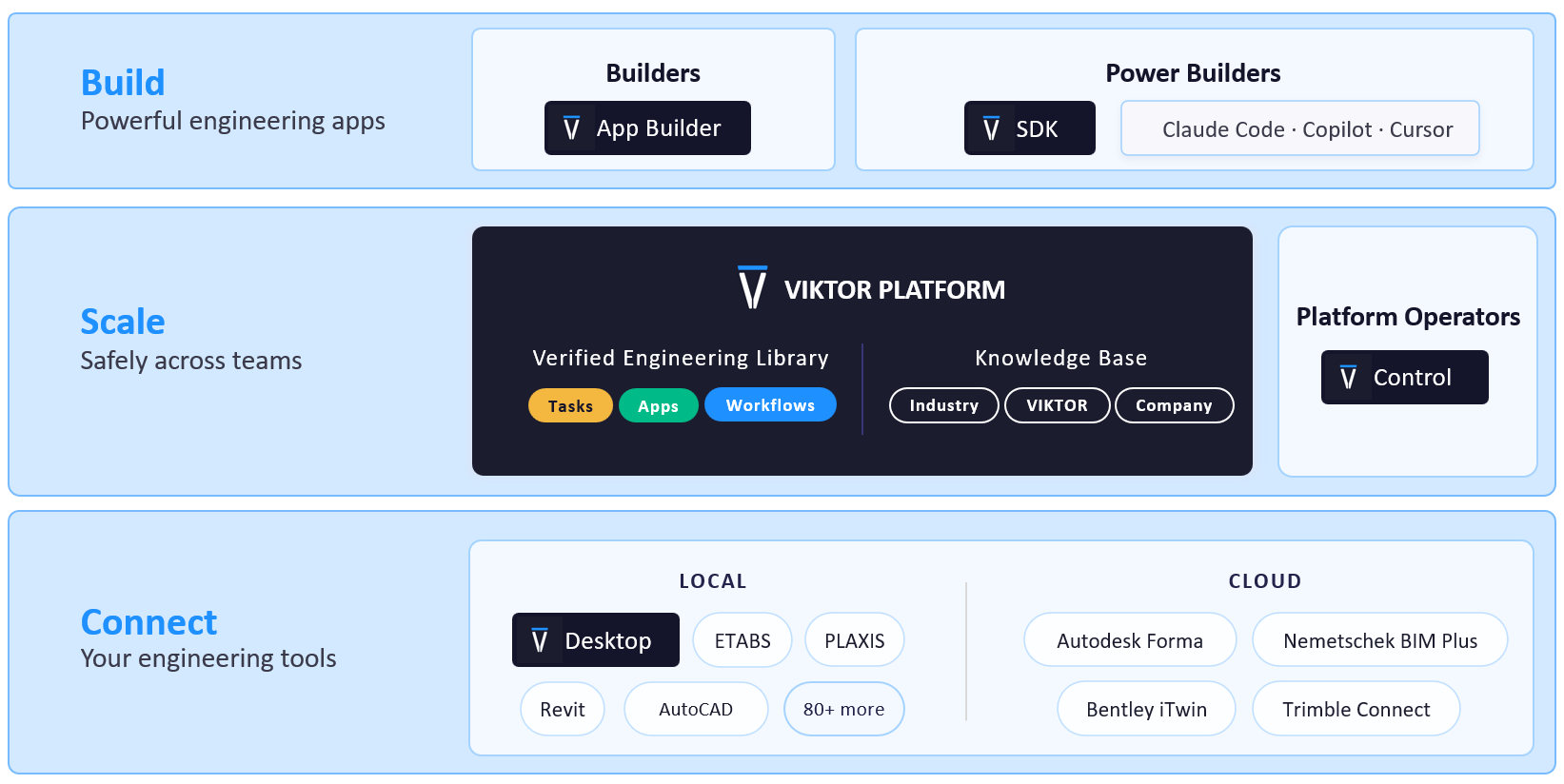
The VIKTOR AI platform gives you one place to automate engineering work, connect to the software you already use, and share apps with your team. You describe what you want to achieve, and VIKTOR AI turns your requirements into an app that performs calculations, processes project data, or generates reports.
The VIKTOR Knowledge Base helps your team keep the engineering knowledge behind these workflows available for future projects. Before sharing an app, your team can check it through development, testing, acceptance, and production (DTAP) stages, with VIKTOR Control managing governance and permissions. Once the app is ready, colleagues can find it in the Engineering Library and use it on another project by providing new project data. This lets your team build on existing knowledge and tested workflows, so you can spend more time reviewing results and making engineering decisions.
The VIKTOR AI approach to engineering results you can trust
Stijn started with a challenge that engineers face on every project. Calculations must follow the relevant standards and give repeatable results, but each project brings different data, requirements, and teams. AI can help you work with these differences, while engineering software and checked calculation tools perform the analysis.
This combination raises questions about trust. How can engineers build tools safely, check that the results are correct, and meet project and contractual requirements? After all, engineers remain responsible for reviewing the results and making the final decisions.
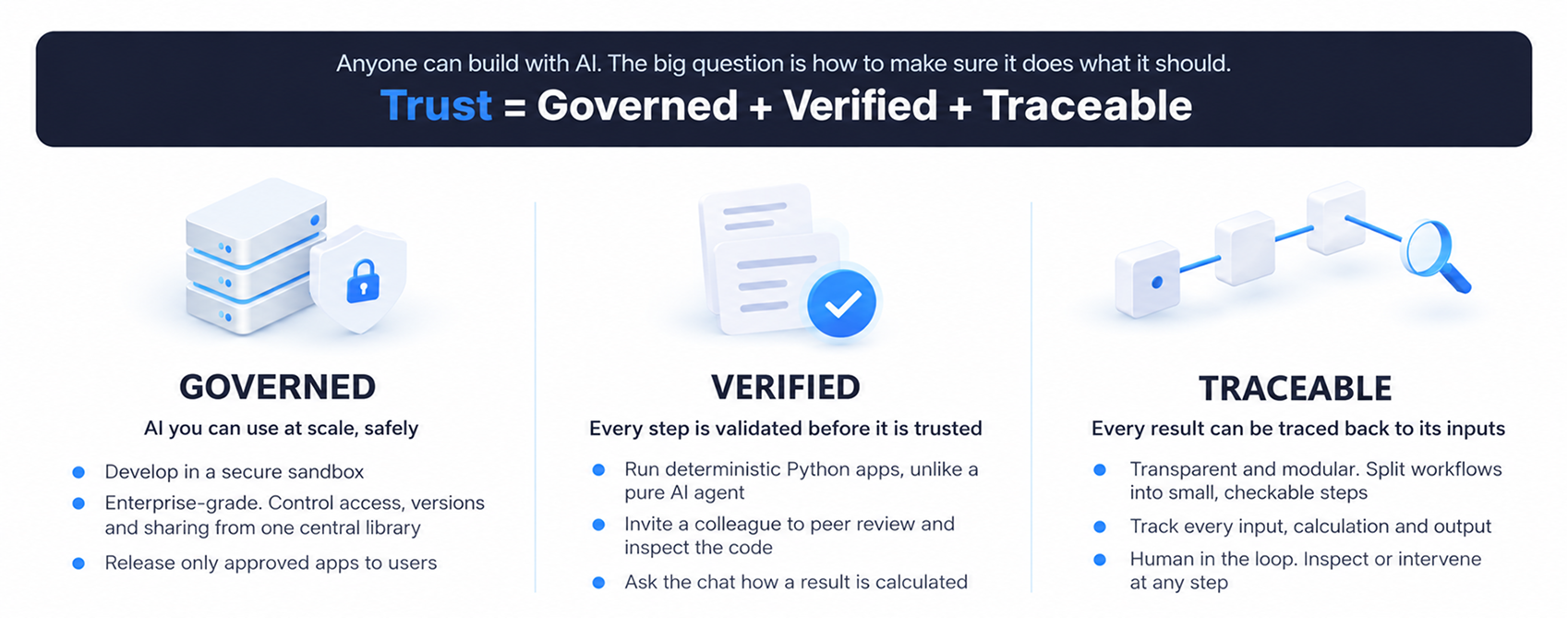
To address these questions, Marcel introduced three parts of the VIKTOR AI approach: ensuring that AI-powered automation is governed, verified, and traceable.
-
Governance controls access, versions, and releases, so reviewers can approve apps before their team uses them.
-
Verification includes inspecting the calculation method and testing the app. Because the app uses Python code, your team can inspect the logic and review it with a colleague. AI can assist with the review, but engineers still need to check the calculations.
-
Traceability helps your team connect a result to its inputs and calculation steps. This gives engineers the information they need to inspect the process, intervene when needed, and take responsibility for the final result.
How do I build, verify, and use a pile capacity app?
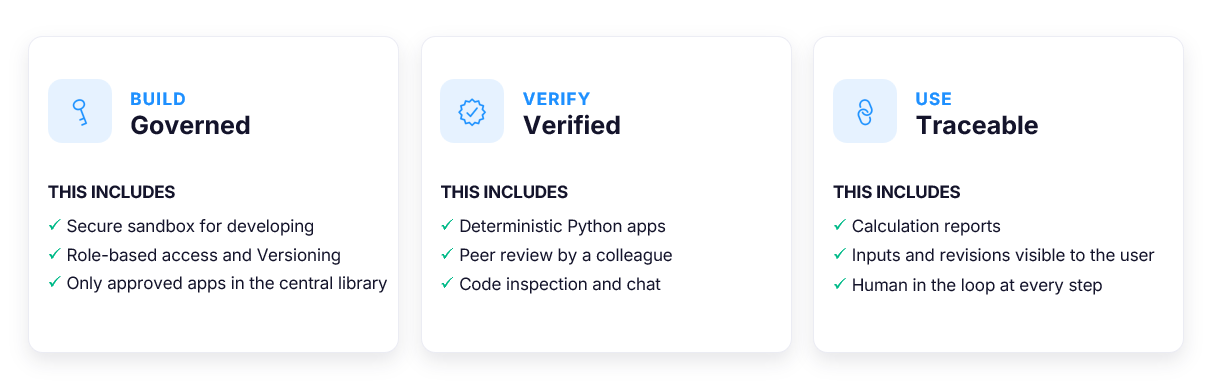
Now, let's see what this looks like in practice. In the webinar, Stijn and Marcel built and reviewed a pile capacity app to show how VIKTOR AI brings the three pillars together:
-
Create an engineering app in a governed environment.
-
Verify the calculations with a colleague.
-
Make the calculations and results traceable.
Governance: how do I create an app in a governed environment?
Stijn explained that calculating pile axial capacity usually requires several spreadsheets. You have to set up the soil layers manually in Excel and organize the pile inputs, calculations, and results across the sheets. Creating a nice user interface for colleagues to enter data and review results takes more work.
With VIKTOR AI, Stijn showed how you can create this workflow from a prompt. The app brings editable inputs, a two dimensional (2D) pile model, and results in tables and graphs into one interface. Your colleague can inspect the model and results together when reviewing the calculation. This can save time spent updating separate spreadsheets, so your team can focus on reviewing the calculations.
You can create the app with this prompt in the VIKTOR App Builder:



Pile Capacity Calculator
After creating the app, Stijn explained that VIKTOR AI provides a secure sandbox for developing apps. VIKTOR also provides access controls to manage who can create and maintain apps, and who can access project data. These controls help your team involve the right colleagues in development and review before sharing the app with users.
Verification: how do I check the calculations with a colleague?
Next, Stijn shared the app with Marcel for review. You can use the App Builder's Invite button to add your colleague as a maintainer. They can inspect the code, conversation history, and app revisions. Leave the App Builder before your colleague starts, as only one maintainer can work in it at a time.
Marcel then took the spotlight and showed the /chat functionality in the App Builder. He used it to ask how the app worked. Switch from Build to Chat beside the send button to ask questions without changing the app. For example:
1
2Explain how this app calculates pile axial capacity.
3Which equations, soil properties, units, and factors of safety does it use? How does it calculate design capacity, utilization, and pass/fail?
4Describe its assumptions and limitations.
5
Traceability: how do I make the calculation traceable?
Marcel followed this review with a request for descriptive input text and an engineering report. At the request of an engineer in the webinar chat, he also added the option to export the report as a Word document. This lets you share the inputs, equations, and results with colleagues for review. Return to Build to make these changes. The following version includes the Word export and expands his request to include equations and calculation steps:
1
2Add descriptive text to the inputs to explain each value and its units.
3Add an engineering report with the current inputs, assumptions, methodology, equations, calculation steps, and results.
4Explain how ultimate capacity, design capacity, utilization, and pass/fail are calculated.
5State the source and value of each factor of safety.
6Keep the report consistent with the code and current results.
7Do not change the calculation method.
8Add an option to export the report as a Word document.
9
Version management: how do I test and manage app versions?
After Marcel finished checking and improving Stijn's app, he published it. In the VIKTOR AI platform, you can publish an app for testing before releasing it for use on projects.
Use Publish in the App Builder and select Testing as the destination. VIKTOR AI keeps testing and production versions separate, so colleagues can test an update while project users continue with the current production version.
For the pile app, ask a colleague to run a case with known results. Compare the capacity, utilization, and pass/fail status, then check that the Word report uses the same inputs and results. Resolve any differences before releasing the version to production.
Marcel then explained how to manage releases through the app's version history. From Develop, open the app's Details page and go to the versions tab. It lists each published version, its tag, who published it, the publication date, and whether it is deployed to testing or production.
As a maintainer, you can select a reviewed version for production or return to an older compatible version when needed. Testing always runs the latest published version. VIKTOR AI checks compatibility when you confirm a version change.
What's next
Finally, Stijn and Marcel shared the planned next steps for the governed, verified, and traceable stages:
-
Governed: Add repository integration and extend access based on roles to testing.
-
Verified: Add automated security and quality checks and a guided review process for verifiers.
-
Traceable: Support evidence of the review process and provide an administrator overview.
If you want us to prioritize one of these improvements, share your request in the VIKTOR Community forum. Tell us which feature would help your team and why.
Conclusion
In this webinar, Stijn and Marcel showed how your team can automate engineering processes in a governed environment, verify calculations with colleagues, and make results traceable. With this approach, you can make sure that your team understands how the calculations work, checks the results before use, and reuses approved apps across projects. The pile capacity app was one example of how to put this approach into practice.
Try these steps with an engineering calculation your team uses, or book a demo here to see how VIKTOR AI can support your team's development and review process.
Start building apps for free