November 12, 2026
What's new in VIKTOR (November 2026)

by VIKTOR
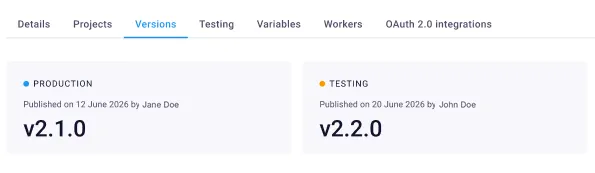
Choose which app version runs in test & production
You can now publish a new version of your app to your test workspace without changing the version that runs in production.
Once you've validated the version, you decide when it's released to production, either while publishing or later from the redesigned versions table.
Under the Versions tab on the App Details page, you can see which version is live in test and production and which versions you’ve released to production before. Head to our documentation to learn more.
40% faster apps for selected integrations
Apps that integrate with ETABS, SAP2000, AutoCAD, and Civil 3D now run up to 40% faster, especially apps that create or read thousands of elements in a model.
Instead of sending each call to the software separately, the app now sends calls in batches of up to 200, which removes most of the waiting time between them.
To get this speedup, update the SDK or VIKTOR Desktop to the latest version.
Run your VIKTOR apps from an AI assistant
You can now call your VIKTOR Apps from a third-party AI assistant such as Claude, **ChatGPT **or Gemini, using the Model Context Protocol (MCP).
Ask the assistant to check a beam or generate a report, and it fills in the app’s inputs, runs the app and reports the result back to you.
Add the VIKTOR MCP to the third-party agent, log in with your VIKTOR account and give the agent access to call your VIKTOR apps. Only the app's logic is exposed to the agent, it cannot read or write project data. Try it out now!
*Please note: This is a beta feature. Some input fields and result types aren’t supported yet, so check the documentation to see which apps work with it. *
Manage your files in the App Builder
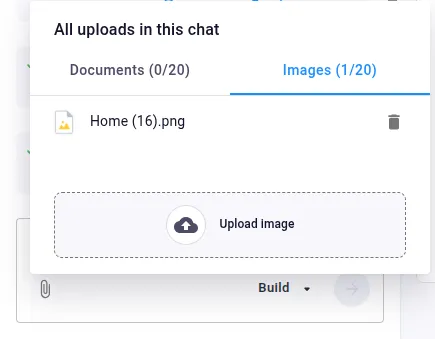
You can now view and delete the files and images you’ve uploaded as context in an App Builder conversation. That way, you can keep adding context in long conversations, even after reaching the limit of 20 documents and 20 images per conversation.
You can manage your files by clicking the paperclip icon in the prompt field of the App Builder.
Read more in our documentation.
Python 3.15 for local development
You can now use Python 3.15 (released in Oct 2026) when you develop apps locally with the SDK:
- Mark imports as lazy. This speeds up startup by loading libraries only when your code first needs them.
- Find slow parts of your code with Tachyon, a new profiler that analyzes running Python processes with low overhead, without changing your code or restarting the process.
- Read clearer error messages.
To use it, update to the latest SDK version.

📎 Other changes
SDK
SDK version v14.38.0 is now available: changelog
CLI
CLI version v0.52.0 is now available: changelog
PLATFORM
- Changed the pre-filled version in the publish dialog to recommend semantic versioning
- Fixed the tooltips of the most recent months and weeks on the activity dashboard charts showing data from the previous year
- Added support for the visible parameter on the LineBreak field
- Added support for a custom attribution text on map views
- Replaced the alert on the SSO login page with a title text
- Fixed an app builder crash when encountering an improperly formatted chat response
- Publishing an app with an entity type name or label longer than 128 characters now returns a validation error instead of a server error.
- Added a notification that warns when the SSO client secret is about to expire
- Fixed clicking the VIKTOR logo and home icon to always take users to the homepage
- Added bulk file deletion to the FileField and editor file manager
- Simplified dates and times across the interface
- Refreshing an OAuth2 integration token asks the user to log in again, instead of failing with a server error, when the provider rejects the refresh.
Start automating your workflows
Related Blog Posts

Get our best content in your inbox
Subscribe to our newsletter and get the latest industry insights