Manual design force comparison
As a structural engineer specialized in bridge design, Vishva frequently works with analysis tools like MIDAS Civil. These tools generate detailed results for different load cases and design assumptions, but comparing those results across versions is not straightforward.
Each design iteration results in a new model. To understand what changed, engineers typically export results to Excel, build comparison tables, and manually assess differences. This process can take hours per comparison, and lacks visual clarity, making it harder to interpret results or communicate them to stakeholders.
Desig force comparisons in minutes with VIKTOR AI
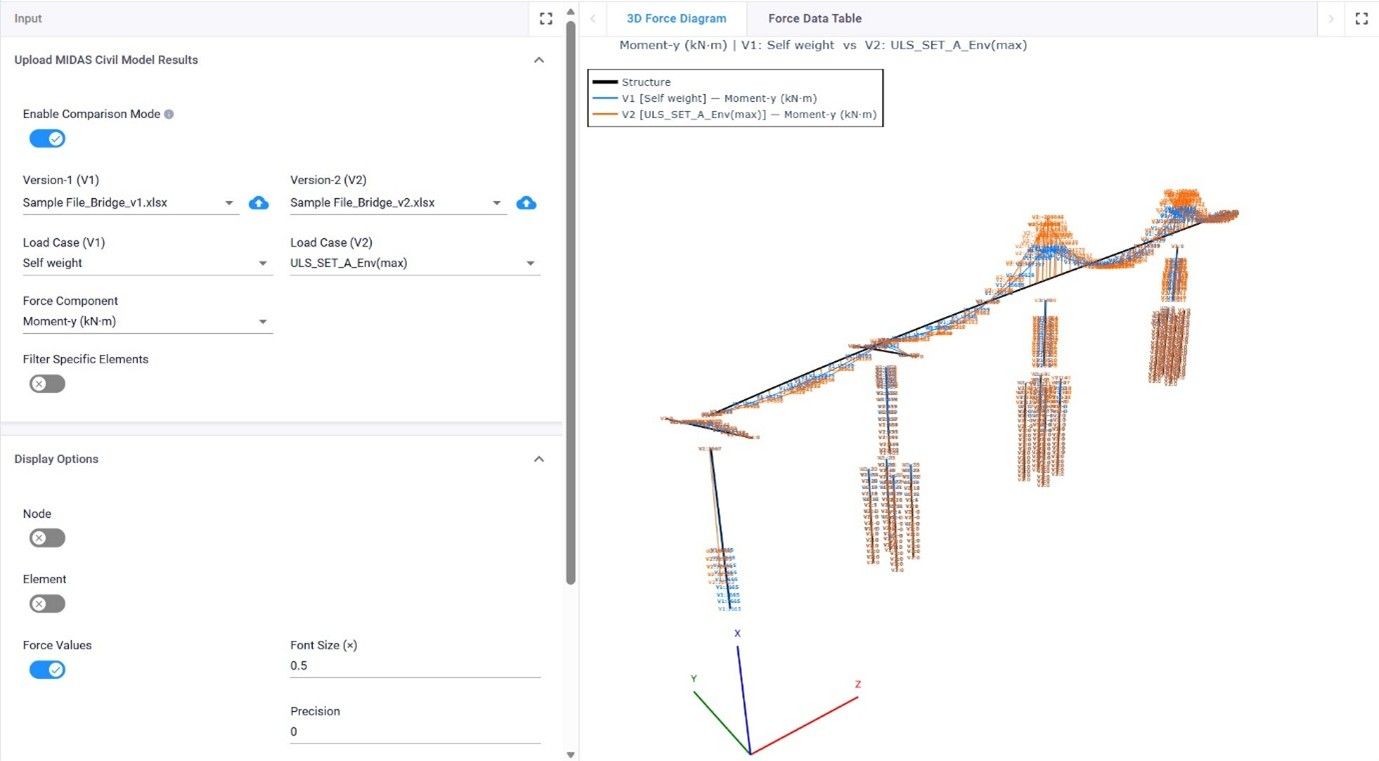
Vishva used the VIKTOR App Builder to build an application that automates design force comparison. Without a strong coding background, he started building the app using prompts, translating his engineering logic directly into an application. Within a short time, he developed the Structural Force Visualizer. The app runs on the VIKTOR AI platform, so colleagues can use it in the browser without installing anything.
I only had to tell what I wanted, and it started building it. With just a few prompts, I already had a working workflow.

Vishva Prakash Sahu
Structural Engineer
With the app, engineers can:
- Upload analysis results directly from Excel
- Visualize structural force diagrams in an interactive 3D environment
- Overlay the design forces of two versions in a single view
- Instantly see differences per element, including exact percentage changes
Instead of working through static tables, engineers can now explore results visually, making it much easier to understand what changed and why. What used to take hours of manual work—building tables, comparing values, interpreting results, can now be done in minutes.
Because the comparison runs as an app with defined inputs and outputs, the same two models always give the same result, which engineers can check element by element.
From bridge design to other engineering workflows
While the app was built for bridge design, the underlying approach is much broader.
The same workflow (uploading data, visualizing results, comparing versions) can be applied across different engineering tools and disciplines. Vishva’s next step is to make the app more generic, so it can handle inputs from multiple software tools.
Start automating yourself
Vishva’s app started with a simple idea: this should be easier. Using VIKTOR AI, he turned that idea into a working solution in no time.
Try the Structural Force Visualizer or start automating your own engineering workflows with AI in VIKTOR.