
If you missed the webinar, you can find more details and a link to the recorded session on this web page.
What is VIKTOR AI?
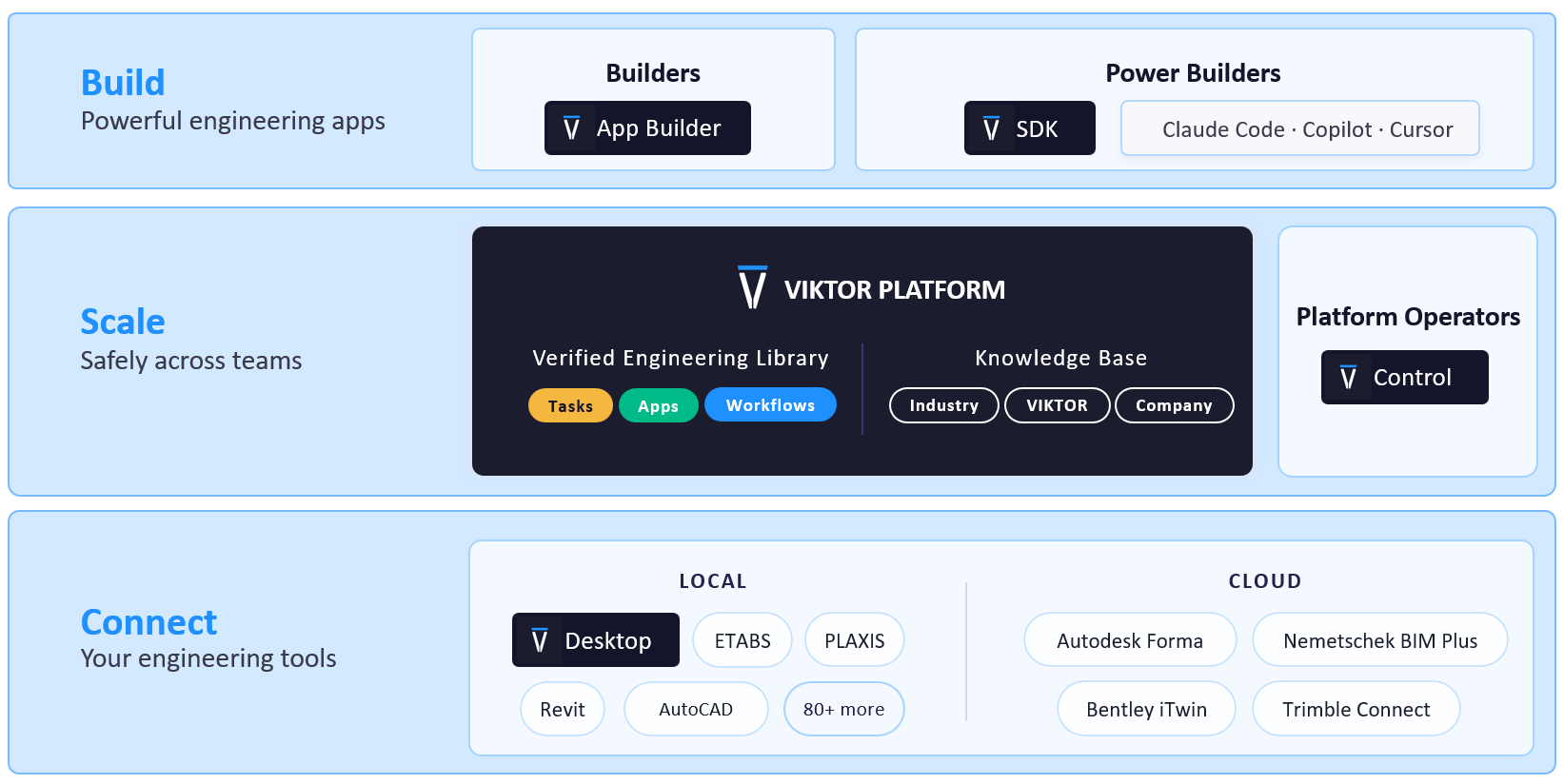
The VIKTOR AI platform gives you one place to automate engineering work, connect to the software you already use, and share apps with your team. You describe what you want to achieve, and VIKTOR AI turns your requirements into an app that performs calculations, processes project data, or generates reports.
The VIKTOR Knowledge Base helps your team keep the engineering knowledge behind these workflows available for future projects. Before sharing an app, your team can check it through development, testing, acceptance, and production (DTAP) stages, with VIKTOR Control managing governance and permissions. Once the app is ready, colleagues can find it in the Engineering Library and use it on another project by providing new project data. This lets your team build on existing knowledge and tested workflows, so you can spend more time reviewing results and making engineering decisions.
VIKTOR AI's vision on the next phase in engineering automation
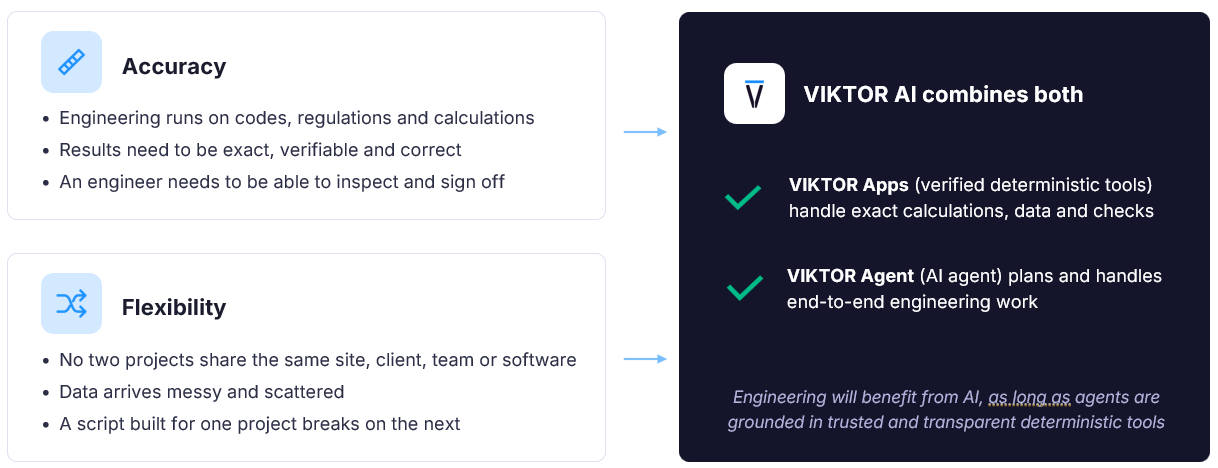
As Wichert and Stijn mentioned, there are two conflicting patterns in engineering:
-
Calculations must follow codes and give results that engineers can check and sign off.
-
At the same time, every project brings different data, software, and requirements. They explained how VIKTOR
AI brings these needs together. Teams can use AI to help organize the work fast, while verified apps carry out calculations with methods engineers can inspect.
VIKTOR AI was founded by engineers in 2017, and the platform launched in 2019 to help engineers create and share Python tools to automate engineering work. In 2025, the VIKTOR App Builder introduced a way to build apps with AI, making automation accessible to more engineers. Together, these developments laid the foundation for how VIKTOR AI connects engineering tasks, apps, and workflows today.
How does VIKTOR AI work?
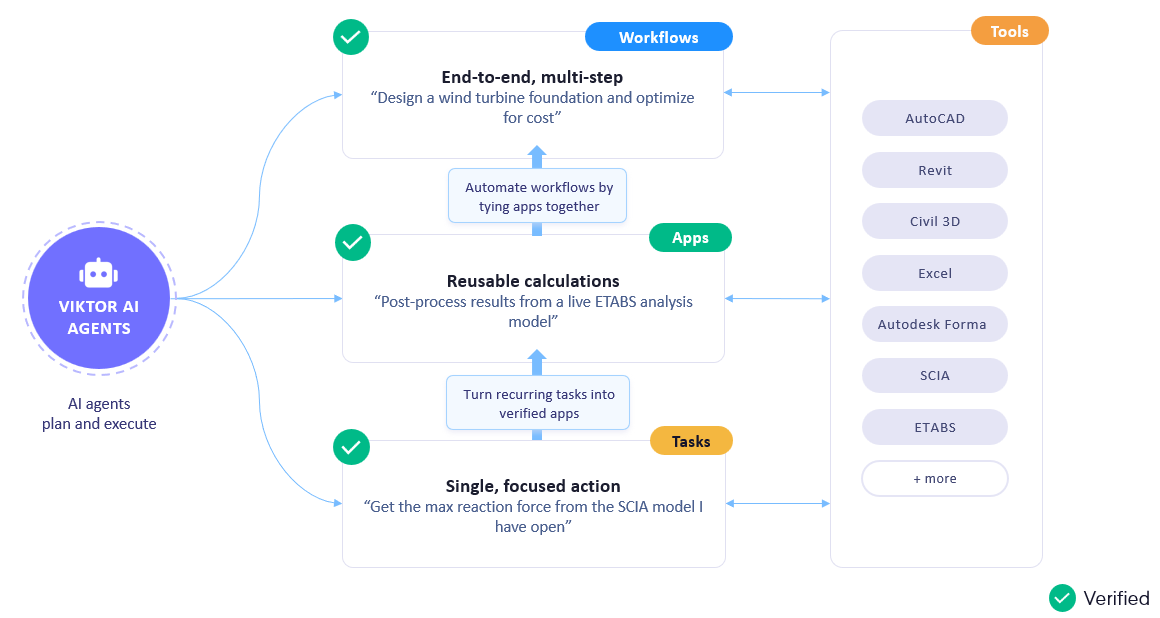
The VIKTOR AI platform supports different types of engineering work. You can start with a single task, such as extracting a reaction force from an open model. If your team repeats a calculation, you can turn it into an app, verify the method, and share it with colleagues. You can also connect apps and software in a workflow, so the result of one step becomes the input for the next. Your team can check the work at each stage.
Introducing the VIKTOR Agent
During the webinar, our CPO Stijn introduced the VIKTOR Agent as a way to carry out these tasks and workflows. You can describe an engineering task in plain language and ask it to perform actions in supported software. The agent can also call your team's verified VIKTOR Apps. For example, it can use an app your team has checked to carry out a calculation as part of a larger workflow.
The agent proposes a plan that you can review, change, and approve. It then writes Python code that you can inspect and test. VIKTOR Desktop connects the agent to supported software on your Windows computer, so it can read model data and make changes. This gives you a way to follow the steps and check the calculations and results.
From an AutoCAD drawing to a parametric bridge app with the VIKTOR Agent
In the first live demo, Wichert asked the VIKTOR Agent to create a two dimensional (2D) truss bridge drawing in AutoCAD. The drawing included side, top, and front views with dimension labels. He then asked the agent to widen the bridge from 4 m to 5 m. The agent generated an updated drawing with the new width.
Wichert then showed how to make the bridge parameters editable in a reusable app. He copied the generated script, opened the VIKTOR App Builder, and pasted the script into it. He asked the App Builder to create an app with bridge inputs and a 2D preview, then tested it. A colleague can use the app to change the bridge dimensions through its inputs.
To create a similar app in the VIKTOR App Builder, use the following prompt.


Parametric 2D truss bridge drawing generator
Orchestrate pile design from ETABS to AutoCAD with the VIKTOR Agent
The bridge demo started with dimensions that Wichert supplied. In the second demo, the inputs came from an open ETABS model. Stijn asked the VIKTOR Agent to read the maximum support reactions and the coordinates of the supports. The reactions supplied the loads for sizing the piles. The coordinates located the supports on the foundation plan.
Stijn then showed a verified bearing capacity app he had created. The app uses cone penetration test (CPT) data and the applied loads to estimate the required pile lengths. The VIKTOR Agent passed the reaction loads from ETABS to the app and used its results for the next step.
A generic AI assistant can suggest a calculation, but an engineer still needs to establish the method it uses. Here, the agent calls an app with a calculation method that has already been checked. Your team can inspect the app, check the loads and soil data used as inputs, and review the results. The agent connects the steps, while the verified app performs the calculation.
Once the app had determined the pile diameters and lengths, the agent connected to AutoCAD. It used the ETABS coordinates to lay out the piles in plan and added the calculated lengths to the drawing.
How can I try the VIKTOR Agent?
You can get early access to the VIKTOR Agent, which is currently in beta. General availability for VIKTOR AI customers is planned for December 2026.
To request early access, fill in the VIKTOR Agent beta program form. The VIKTOR AI team will contact you about access.
Conclusion
In the webinar, Wichert and Stijn showed how the VIKTOR Agent can automate tasks in engineering software and connect them into workflows. Wichert turned an AutoCAD bridge drawing into a reusable app. Stijn connected ETABS reactions, a verified pile capacity app, and an AutoCAD plan. The agent carried data between the tools, while the verified app performed the calculation.
These are two examples you can extend to other tasks and software across your organization. Your team can verify and share apps, then use them in workflows across projects. This helps reduce repetitive work while engineers review the agent's plan, calculations, and results. To explore what the VIKTOR Agent can do for your team, sign up for the beta program or book a VIKTOR demo.

Related Blog Posts
Get our best content in your inbox
Subscribe to our newsletter and get the latest industry insights